I Want To menu icon.

I can not get an I Want To Menu control to display with the icon I've chosen in its property configuration. I want it to be just an icon without any text.
-

I believe that icon is only used in the component tree in the designer. It is possible to use emoji's (or any unicode character in general):
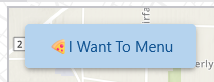 0
0 -
I would agree that it is only showing up in the designer tree, but why? It is the only control I've found with an icon setting that doesn't honor it in the interface. The Help documentation for the Icon setting is the same as other controls that do honor it. It's a bit of a problem on a mobile layout with an I Want to Menu that uses only text instead of an icon from the library. Maybe that's just an enhancement request I need to make. Appreciate your reply!
1 -
I'm not sure about it being the only control that does not honor the icon. Rather the contrary, only menu items, buttons, controls that are inside an Expand, and the Geolocate widget seem to show their icons in the user interface, all others don't. (I didn't check all of them, so maybe I overlooked one or two)
That said, having an icon on the I Want To menu would be a nice addition.
In the mean time, maybe you could use one of ≡, 𓃑 or ⋮
0
Vous devez vous connecter pour laisser un commentaire.
Commentaires
3 commentaires