How to populate Get Value Coded Domain activity using the "Layer" input?

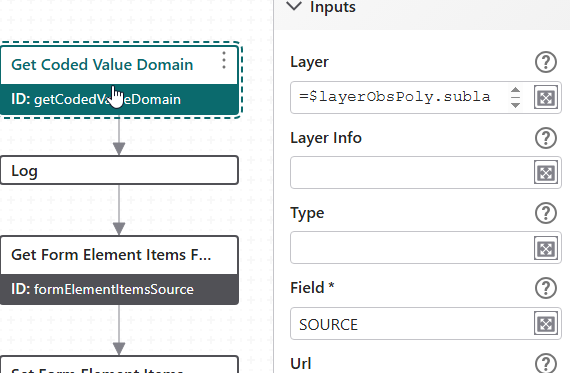
Hi. I'm trying to get a domain using the Get Coded Value Domain activity for a Studio Web app. I can get it to work if I use the Url option, and supply the url to the map service layer that I'm after. Instead, I want to use the Layer input rather than the URL input.
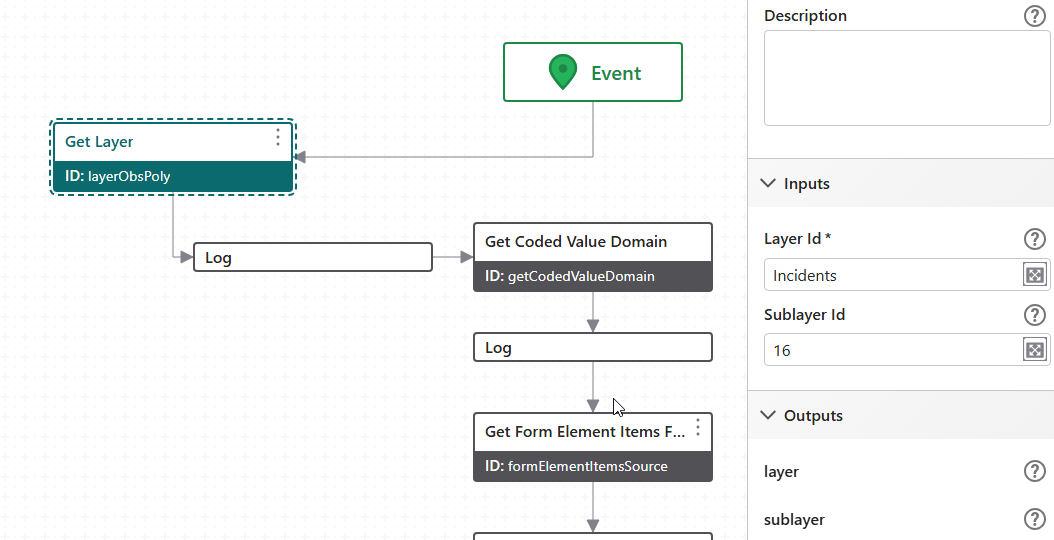
First, I use the Get Layer activity to create $layer1, supplying the webmap layer as the Layer Id and the layer number as the Sublayer Id. I know it creates $layer1 correctly as I can run a Query Layer activity using $layer1.sublayer as the Layer and get the results. However, when I try to use $layer1.sublayer as the Layer input in the Get Coded Value Domain activity, the resulting domain is undefined. What's the correct input for Layer?
Thanks,
Chris
-

Hi Chris, I'll chime in here and give my thoughts on this.
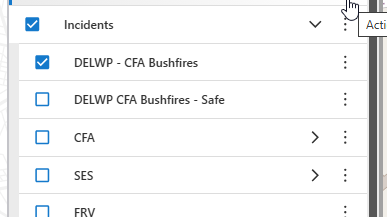
I've found the Get Layer activity a bit quirky in all honesty, but this one is working for me. The key here was to add the webmap service (or folder?) name to the mix (if it exists). In my case I have a webmap composed of layers and the result in the VSweb layerlist presents as below. Incidents is the ‘parent’ item. In my case, the service name, but I assume this could be a user defined folder name also (?). The sublayer id (16) in my case, is the layer id on the actual ArcGIS rest service the webmap is referencing.
Hope that makes sense?
 0
0 -
Thanks Gareth. That's exactly what I'd tried. I know that the layer is created property, because if I run a query activity on it (using $layer1.sublayer) it finds the records.
The weird thing is, while it fails 90% of the time, it occasionally does work. I haven't been able to figure out what causes it to work - going to open a support case on it.
Chris
0 -
Yeah - strange that it works some times but not others. I went down the url approach in the end, but that ties you to static layer ids which is not all that accommodating of change
Interested in hearing what support have to say on this one.
0 -
Amanda Frech was able to explain what's going on. Turns out the when you create a layer, the sublayer field information isn't populated until an identify operation has been performed. So to use the Layer input ($layer1.sublayer), to get around this problem, at the start of the workflow I use a Get Map activity and a Create Point activity to create a point at 0,0 (nowhere near my actual data). Then I use a Run Operation activity with an Operation Name of tasks.identify and an Operation Parameter of {"geometry": $point1.point,"layersInScaleRangeOnly":false,"visibleLayersOnly":false,"maps":$map1.map.extension}
Doing this populates the sublayer field properties, and the Get Coded Value Domain activity works.
It's logged as bug tracker 341892, so may be fixed at some point in a future release.
Chris
0
Vous devez vous connecter pour laisser un commentaire.
Commentaires
4 commentaires