Set Query Builder Layers

I would like to know if it is possible to configure the Query Builder so that it targets a specific layer by default, instead of listing all layers in the map. In other words, I want the Query Builder to show only one predefined layer in the layer source, while still keeping the main Query Builder available for querying across all layers in the map.
To achieve this, I created two buttons:
- one for running the standard query across all layers,
- and another for running a query on a specific layer only.
I tried using the codes below for the second case, but it didn’t work.
First code:
[
{
"name": "query-builder.set-query",
"arguments": {
"layers": { "title": "Percelen" }
}
}
]
Second code:
[
{
"layers": { "title": "YourLayerName" }
} , query-builder.set-query
]
-

It should be possible, but I couldn't find an example of the query-builder.set-query command (or the related query-builder.display-query, filter-builder.set-filter or filter-builder.display-filter commands).
0 -
I missed the example given here, and I do not directly see what's wrong with the syntax of your samples.
Example: Query within an extent, selecting the layer to query by title.
{
   "geometry": {
       "xmin": 13871520.850500003,
       "ymin": 3910293.086000003,
       "xmax": 14574034.873400003,
       "ymax": 4686306.161399998,
       "spatialReference": {
           "wkid": 102100,
           "latestWkid": 3857
       }
   },
   "layers": {
       "title": "Buildings"
   },
   "where": "FULL_ADDR = '900 GOVERNMENT ST'"
}
0 -
I used this code: [
{
"name": "ui.activate",
"arguments": {
"component": "item://query-builder/query-builder-config-1"
}
},
{
"name": "query-builder.set-query",
"arguments": {
"where": "FULL_ADDR = '900 GOVERNMENT ST'",
"layers": {
"title": "Buildings"
}
}
}
]
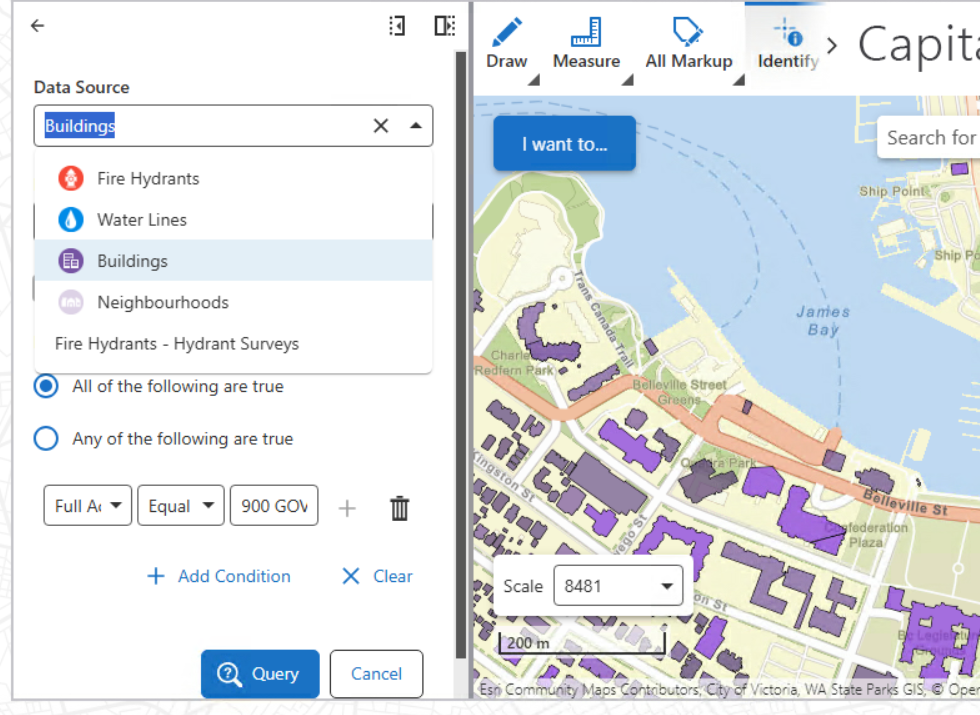
but still other layers are shown in the data source option. I want to hide others and only keep one.
 0
0
Vous devez vous connecter pour laisser un commentaire.
Commentaires
3 commentaires