Can not create polygon with run command -> map.add-markup

I try to create a rectangle polygon via the map.add-markup run command in VS Workflow (Version 5.46.0) and it is not working.
the workflow is simple:
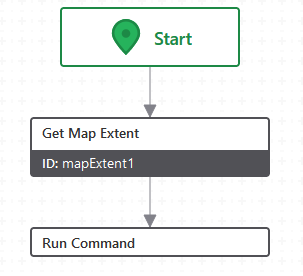
If I try the example for a point markup as mentioned in the VS workflow documentation
https://developers.vertigisstudio.com/docs/web/api-commands-operations/#commands
it works fine in VS Web (Version 5.37.0).
={
"collection": "my-custom-markup",
"graphics": [
{
"geometry": {
"x": $mapExtent1.center.x,
"y": $mapExtent1.center.y,
"spatialReference": {
"wkid": 25832
},
"type": "point"
},
"symbol": {
"color": [76, 115, 0, 255],
"size": 16,
"style": "square",
"type": "simple-marker"
}
}
]
}
But if I modify to “type”: “polygon” it is not.
={
"collection": "my-markup",
"graphics": [
{
"geometry": {
"markuparea":
[
[
[$mapExtent1.extent.xmin, $mapExtent1.extent.ymin],
[$mapExtent1.extent.xmin, $mapExtent1.extent.ymax],
[$mapExtent1.extent.xmax, $mapExtent1.extent.ymax],
[$mapExtent1.extent.xmax, $mapExtent1.extent.ymin],
[$mapExtent1.extent.xmin, $mapExtent1.extent.ymin]
]
],
"spatialReference": {
"wkid": 25832
},
"type": "polygon"
},
"symbol": {
"color": [76, 115, 0, 150],
"style": "solid",
"type": "simple-fill",
"outline": {
"color": [76, 115, 50, 255],
"width": 1
}
}
}
]
}
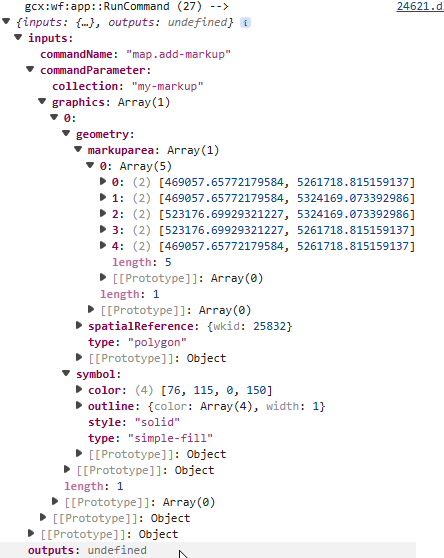
this will result in no changes to the map in VS Web.
DevTools show as output for the run command only undefined
Instead I tried the following with no success (mentioned as envelope in https://developers.arcgis.com/rest/services-reference/enterprise/geometry-objects/)
={
"collection": "print-markup",
"graphics": [
{
"geometry": {
"xmin": $mapExtent1.extent.xmin,
"ymin": $mapExtent1.extent.ymin,
"xmax": $mapExtent1.extent.xmax,
"ymax": $mapExtent1.extent.ymax,
"spatialReference": {
"wkid": 25832
},
"type": "polygon"
},
"symbol": {
"color": [76, 115, 0, 150],
"style": "solid",
"type": "simple-fill",
"outline": {
"color": [76, 115, 50, 255],
"width": 1
}
}
}
]
}
I also tried to chnage type to extent but again without success.
Does anyone have any idea what I do wrong?
-

Yes, the geometry is not correct. If you want to specify the coordinates as xmin, xmax, ymin, ymax, you should use an envelope not a polygon. If you want a polygon, you should define ‘rings’.
Also, ‘markupArea’ is not part of the geometry specification, so where does that come from?
The easiest way to add a rectangle of the map's extent is
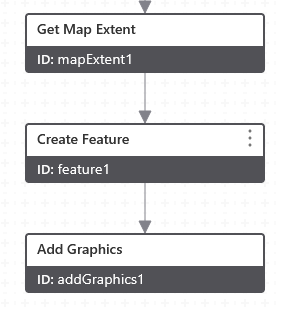
feature1: Geometry: =$mapExtent1.extent
addGraphics1: Features: =$feature1.feature
0 -
Hello Berend,
thank you for your quick response.
The easy way with create feature and add graphics works fine. Still with run command I do not get what I want. Maybe due to my limited knowledge an experience with those scripts.
“markuparea” before was named "rings" as in the esri example but that didn't work. I still do not know wether I need “graphics”, “geometry” etc. to make it work with the run command.
0
Vous devez vous connecter pour laisser un commentaire.
Commentaires
2 commentaires