Use a Variable in Query Layer Where Clause

Hello,
i created a start-link workflow which is using a edited cascading search workflow from the productivity-kit. When i use the alert function the workflow input, which is used in the workflowParams part in the URL, is shown without any problem.

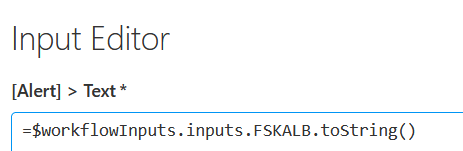
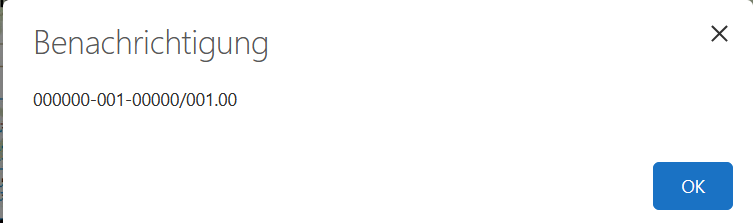
After the alert function, the workflow is calling the query layer function. I tried to use the variable from the alert function in the where clause:
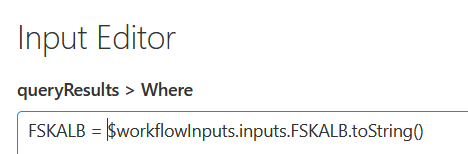
With that i get an error after the alert. When i using a string in the where clause like FSKALB = ‘000000-001-00000/001.00’ the search is working without any problems at all after the alert.
How can i get the variable in the Where Clause to work so it is using the same value which i get in Alert prompt?
Thanks!
-

You need to use an expression to be able to use a variable.
To replace the variable my suggestion is to use Javascript Template Strings
=`FSKALB = ‘${$workflowInputs.inputs.FSKALB.toString()}’`
Or you can olso use the old mode
="FSKALB = '" + $workflowInputs.inputs.FSKALB.toString() + "'"
1 -
Victor Catalán oh wow thank you! Works like a charm with the old mode. The first didnt work for me. Maybe some of the inverted commas in your first recommendation gets destroyed when i copy it?
But thanks for the fast solution! Alot to learn about this syntax in VertiGIS Studio Workflow :D
0 -
I am happy to help! You must always remember to use expressions in any workflow input with the equality operator. Then they are simple JS expressions. Surely you will get into this :)
1 -

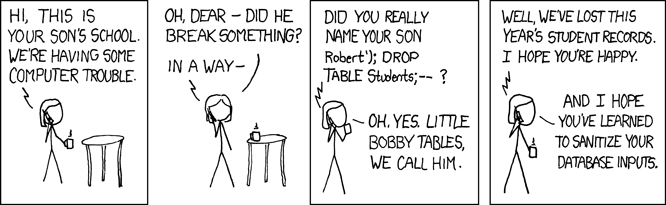
Sven de Haan , I'm not sure if your workflow is intended for production use, but I would caution you about the current structure. As it stands, it is a prime candidate for a SQL injection attack. You have a value passed in via the query string which is then concatenated with the other part of the WHERE clause.
It would be wise to clean the value in some way, such as escaping any quote characters.
This cartoon is my favourite explanation of SQL injection:
(Source)
1 -

Ken Lyon I would assume that the where-clause in a Query Layer activity (or rather, the service's /query endpoint) is safe enough for those scenarios? After all, we can just bypass the viewer/workflow and open the rest endpoint in a browser directly to query for Bobby Tables.
Of course it's a different story if a Run SQL Query Unsafe activity is used
And it's always a good idea to do at least some sanity checks on user input.
0 -
Berend Veldkamp You're right - there's likely some escaping that happens within the Esri API prior to actually executing the query. The Run SQL Query Unsafe activity would certainly be a different story.
Still, the pattern just got my spidey senses tingling. :)
0 -
Hi Victor Catalán i got another question about this. In some cases the URL contains multiple FSKALB or FSK values. For example: “&workflowParams={”FSK":"000000000000000001__;000000000000000002__"}
How can i handle this? I want to highlight all values in the URL in the map with the workflow.
My idea is to split the values and then query over each value and then scale to the map at the end. But with this low-code system from VertiGIS Studio Workflow its hard for me to get a startpoint here :'DThanks!
0
Vous devez vous connecter pour laisser un commentaire.
Commentaires
7 commentaires