Comparing dates in query activity

Hi everybody,
I would like to create a simple workflow in which I can compare dates.
In my FC, there is a column called “Date” that I have formatted as a date in ArcGIS Pro and filled with data accordingly.
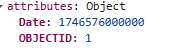
When I output this in VSWorkflow in the console, the date is formatted as a number:
The date I want to compare it with is today's date two years ago. To do this, I used the “Calculate Date” function to calculate the date:
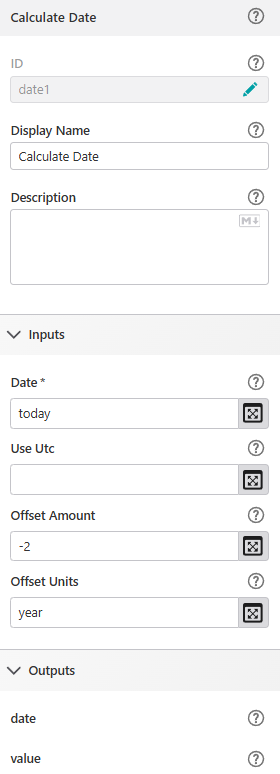
For outputs, I can choose between “date” (date as output) or “value” (outputs the date as a number).
As I understand it, I could now simply compare my date in the table with the output “value” using >/<, but unfortunately it doesn't work.
My command in the query in the “Where” field looks like this:
=`Date>${$date1.value}`
What is wrong here?
Thanks for your help!
Sinje
-

S. Burgert The issue is to do with the difference between SQL dates and JavaScript dates. The numerical value you see is the underlying value within a JavaScript date, but it's not going to work in a query.
Your “Where” field would need to look something like this:
="Date > ‘2023-08-08 00:00:00’"You would need to use the various methods of Date via $date1.date to get the year, month, day, hours, minutes and seconds. You might also need to set Use Utc to true if the source data is stored as Utc dates.
0 -
Hi Ken,
Thanks for the tips. I was able to solve the problem using an Arcade script ($CalculateDate) containing the following code:var now = Now();
var twoYearsAgo = DateAdd(now, -2, ‘years’);
return Text(twoYearsAgo, ‘YYYY-MM-DD HH:mm:ss’);I then created the Where clause in the query as follows:
= “Date < DATE ‘” + $CalculateDate.result.toString() + “’”
As you can see, the DATE function was missing from your suggestion. I also had the problem that your (american?) single quotation marks were misinterpreted, and I had to replace them with the single quotation marks on my keyboard. It took me quite some time to figure that out :)
All in all, it is still surprising that the built-in “Calculate Date” function does not return a date format that can be used for further processing. Instead, you first have to manually adjust it, which is cumbersome.
Kind regards
Sinje
0 -
Hi Sinje,
Thanks for your response. I realize now that I completely forgot about an activity that would have helped a lot with this: Format Date
You can specify the format you want such as “YYYY-MM-DD HH:mm:ss” and get back the appropriate string.
We intentionally kept Calculate Date and Format Date as two separate activities as they serve different purposes.
Regarding the characters used in my example - I think the text editor here tried to make the quotes more fancy. I had used the apostrophe which should have appeared as a single quote, as used to represent a string in SQL.
That's interesting you needed to cast it to a DATE in your WHERE clause. I've not seen the need for that before.
0 -
Hi Ken,
I found the Format Date function, but thought I could only generate the outputs specified in the help section, which wouldn't have helped: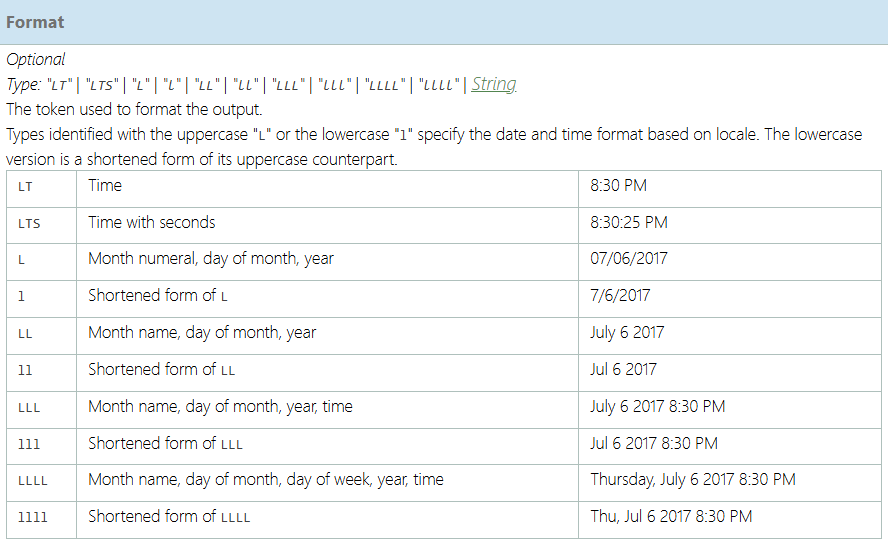
Now I tried to implement your suggestion and specified “YYYY-MM-DD HH:mm:ss” as the format in the Format Date function. However, the output then looks like this: 2023-08-12T08:13:55.000Z. Unfortunately, this is then again not compatible with the time format from the ESRI database.
0 -
Hi Sinje,
The important part was just below the area in your screenshot:

For your case, we'll be using the custom date and time format strings. (https://learn.microsoft.com/en-us/dotnet/standard/base-types/custom-date-and-time-format-strings)
It's important to note this is case-sensitive.
You would need to use “yyyy-MM-dd HH:mm:ss” because the year and day need to be lower-case.
Finally, the output you showed looked like it came from the “iso” output. You need to use the “formatted” output to get the value in your custom format.
I hope this helps.
0 -

Ken Lyon That DATE is not really a cast, but a function. It is documented by Esri here: https://www.esri.com/arcgis-blog/products/api-rest/data-management/querying-feature-services-date-time-queries and here: https://developers.arcgis.com/rest/services-reference/enterprise/query-map-service-layer
These pages have some useful information about date queries, including querying by current date, or using an interval. If leap years are not important, the OP's query can even be simplified to:
date > CURRENT_DATE - INTERVAL '730' DAYYear does not seem to be a supported interval, unfortunately
Also note that dates in queries should be in UTC, not local time, because that's how ArcGIS stores dates (unless you changed that to local time). Depending on the timescale, and where you live, that may or may not be relevant.
0
Vous devez vous connecter pour laisser un commentaire.
Commentaires
6 commentaires