Get Map after application loads

Hi,
Has anyone managed to create a workflow that runs automatically after everything is loaded, and contains Get Map ?
If I put a workflow in the “Application Initialized" event containing “Get Map”, then the Vertigis Studio Web Designer will not load on refresh. Interestingly, the viewer app will load fine with the Get Map activity in a workflow, which suggests this is meant to work.
To test this, you can use a default WebGIS app and a basic workflow:
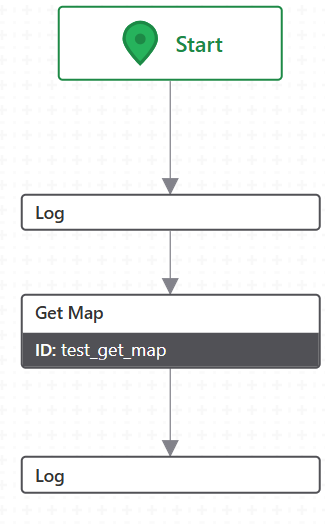
We are on Workflow 5.41.0 and SW 5.31.0
Thanks!
-

I believe a workaround here is to check in the workflow if it is run from app or designer.
0 -
With you there Nico Burgerhart. For anyone in the future:
If you use these activities:
GetBrowserInfo > If > [False] - Get Map | [True] - Do nothing
And this in your If clause:
=$browserInfo1.url.includes("vertigisstudio/web/index.htm")
This will return true if you are in the designer, and false from Viewer applications which seem to have
"/vertigisstudio/web/?app=xxxx" in the url instead of index.htm
Then you have to do all your workflow debugging in the viewer obviously, and the feature won't work in Designer, but at least will work for the end user
0 -

The best approach in that case is to run the workflow after the map was initialized.
You can configure this in the VSW Designer → Map Component → Events
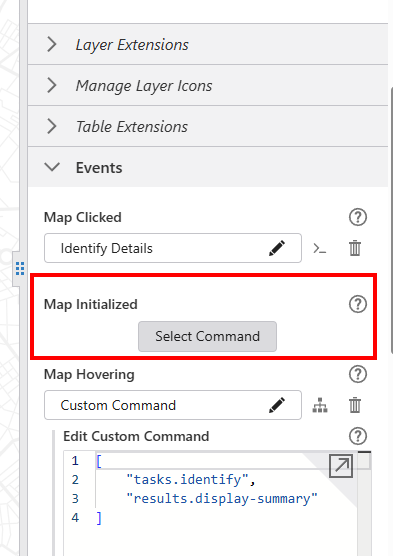
Is there another way, and is to listen when the map was loaded with the property “loaded” from the map object that ArcGIS provides, but then you have to work with events and so on and ca be challenging
1
Vous devez vous connecter pour laisser un commentaire.
Commentaires
3 commentaires