Get OBJECTID from Workflow Input

Hi,
I want to connect an external app to Vertigis Studio. I would like to have a feature action in the results table that, when run for a single feature, displays information about this feature from the external app in a window. To do this, I need to pass the OBJECTID of the feature from which I run the feature action to the external app.
What is the best way to obtain the OBJECTID? I know the “Get Workflow Inputs” activity and have tried using it. Do I need to convert the object to JSON and back again, as suggested here, or is there a simpler way?
Best regards,
Marius
-

I think you can get it this way
=$getWorkflowInputs1.inputs.context[0].OBJECTID0 -
Thanks for your reply Nico Burgerhart, but this didn't work. The result is always
undefined(if I use it in a log activity) or an empty window (if I use it in a Alert activity).I tried doing it via a JSON, and this worked. This is the workflow I used:
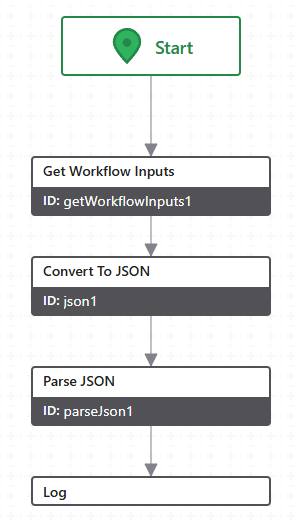
As the input for “Convert to JSON” I used
=$getWorkflowInputs1.inputs.context[0]and as input for “Log” I used=$parseJson1.result.attributes.ID(in the layer I use for testing the ID is just ID, not OBJECTID).So you'd think that
=$getWorkflowInputs1.inputs.context[0].IDor maybe=$getWorkflowInputs1.inputs.context[0].attributes.IDshould give the same result, but it doesn't. This is what my Console looks like when I do it via JSON first and then via these two expressions:
Sidenote:
If I understand this comment correctly, this behaviour
has to do with the difference between a 'VSW feature' and a 'generic Esri feature'.
But if there is a distinction like that, IMHO there should be a “Convert object to feature” activity or something similar instead of the weird JSON workaround.
0 -

Hi Marius,
did you check my request: https://support.vertigis.com/hc/en-us/community/posts/17935576533266-Not-able-to-retrieve-feature-attributes
You could try to add a “Run Operation” with “result.to-graphic” as Operation Name.
0 -
I would make same remark as Yannik, the operation name is result.to-graphics
If you need an example, I've to search for it.
0 -
Hi Yannik (and Nico),
thanks for your replies. I used “Run Operation” combined with “Get Feature Attribute Value”:
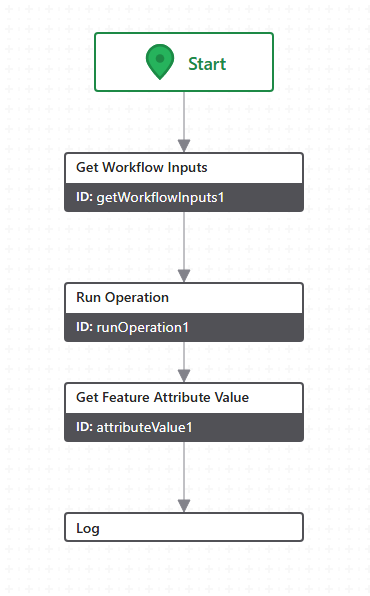
This got my desired result. So thanks for your help!
But there is one thing that still puzzles me. In a comment in the linked thread, Yannik Bäder said:
=$getWorkflowInputs1.inputs.context[0].attributes["OBJECTID"]? If I log this, I receive the correct number.If I log this (changing OBJECTID to ID), I get
undefined. Is this because Yannik is using VertiGIS Studio Mobile, but I'm using Web?0
Vous devez vous connecter pour laisser un commentaire.
Commentaires
5 commentaires