Modify production app

It would be great to have the option to modify the production deployment of an app directly, or alternatively be able to skip items in the deployment stratagy.
Given the workflow where there is the dev version of the app; and a new feature is develped and deployed to testing; while undergoing testing. There is currently no way to say fix a typo on the production deployment without either promoting new features to production before testing is finished, or reverting the test to production.
In an ideal scenario I could have a version of my app in testing.
-> Pull prod to dev
→ Fix error in prod
→ Push dev to prod
→ Then pull test back to dev and continue development (and fix the error here as well).
-

I don't advise anyone to do this - but there is a sneaky work-around that I always use for small changes:
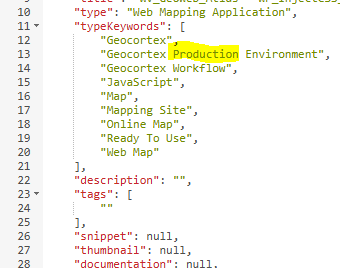
Use ArcGIS Online Assistant to open the JSON of the Web Production app. In there you find “typeKeyWords”. One of them is "Geocortex Production Environment" and you can replace it with “Geocortex Development Environment”, to resemble the Development app. After that change you can find and open the Production app in the designer.
Every time you deploy a new version to Production, the key words will be replaced, so the change is only temporary. But for us it is often a great solution.
Same thing works for Workflows by the way.
 1
1
Vous devez vous connecter pour laisser un commentaire.
Commentaires
1 commentaire