ui.set-visual-state doesn´t work on my panel

I am trying to set the visual state of the lower panel in my app from normal to minimized.
The command for that should look like this:
[
{
"name": "ui.set-visual-state",
"arguments": {
"visualState": "minimized",
"id": "item://panel/ccb25e87-c695-4a7f-bd52-110a019b4d8c"
}
}
]

The console shows this error:
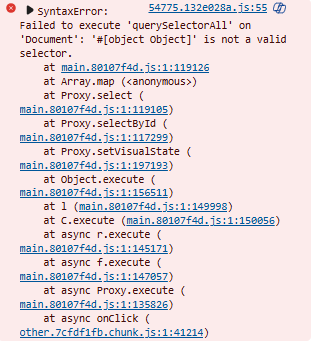
I have no clue what i am doing wrong.
Can anyone help?
Greetings
Simon
0
-

According to https://support.vertigis.com/hc/en-us/community/posts/11792185148818-Way-to-Maximize-Minimize-Panel-Layout-Programatically I think your ID configuration is not correct. See the example there.
2 -
Thanks for your answer, it worked!
0
Vous devez vous connecter pour laisser un commentaire.
Commentaires
2 commentaires