Parameters are ugly/not present with ArcGIS Pro engine

Hi all,
I'm curious whether this is a fault in my implementation, or whether this is a bug. Does anyone else see the same behaviour?
We are using VertiGIS Web, and just installed the new printing engine. Now implementing new templates. However, I'm having issues with the parameters;
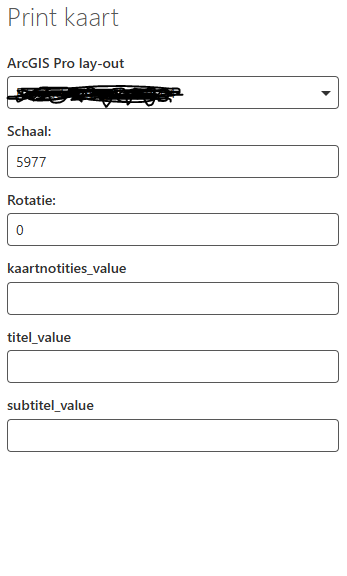
- No matter my design, I see the same parameters everytime. I always get ‘notes_value’, ‘title_value’ and ‘subtitle_value’ (albeit in Dutch).
- If I define more parameters I don't see them when printing.
- If I define less parameters I still see these parameters.
- I am able to use these three parameters in my design, so at least the link works properly. However, I cannot change the description that a user sees. No matter what I do, the parameter is always shown with an ugly description, with underscores.
This behaviour is preventing us from making the step to the new printing engine; in the ‘old’ printing engine, parameters work perfectly fine. Is anyone else having issues with parameters in the ArcGIS Pro printing engine? All advice is welcome! :)
For reference, here is what I set up in the designer (one of many variations I tried):
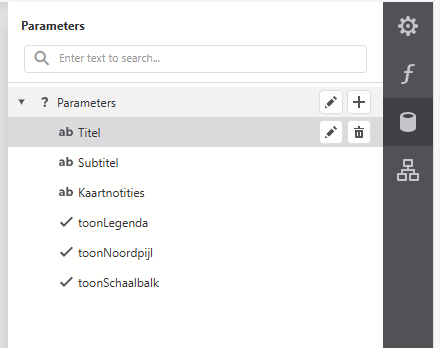
And here is what the user sees when printing from VertiGIS Web (even if I remove all parameters):
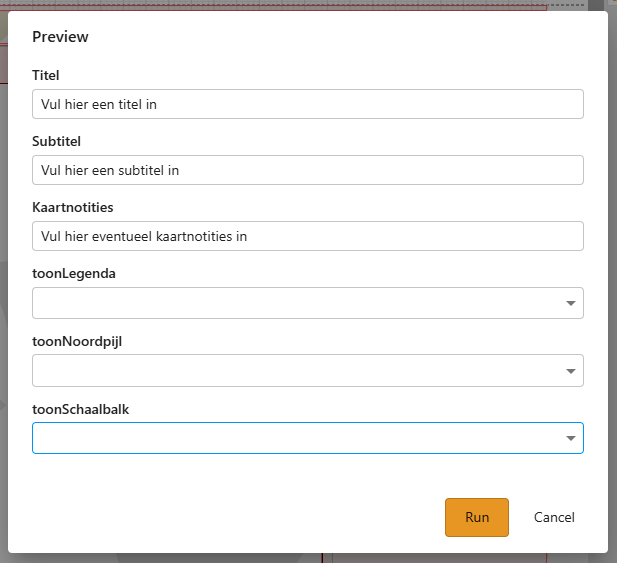
When running a preview of this report from the designer, I do get all the parameters that I expect:
-

We earlier found a comparable issue, bug 306367 was filed, it should be resolved in Web 5.32, but cannot find it in the release notes.
If you want I can create a case at VertiGIS for this issue.
0
Vous devez vous connecter pour laisser un commentaire.
Commentaires
1 commentaire