Print Map dialog - Scale in dialog NEVER can get to match map

When the user tries to print a map, the scale on the “print map” dialog does not match any scale levels in our map. We have “Snap to Zoom” set on our map and all maps are in South Carolina State Plane.
If I try to manually type 2400 into the “scale box”, it will not pop to 2400, it will always go back to some other scale that makes zero sense (in this case 408). I have tried with multiple layouts and multiple scales.
Am I missing a setting somewhere in Web Studio or print templates?

Thank you for any hints you can provide.
-
Commentaire officiel

When discussing issues or functionality related to Studio Printing, it’s important to clearly specify both the type and version of the product being referenced.
I realize I’ve been unclear in previous communications and would like to clarify:
All of my recent descriptions refer exclusively to Studio Printing based on ArcGIS Pro.The changes introduced in VertiGIS Studio Web v5.38 (see [318587] in the change log) affect Studio Printing using .pagx (ArcGIS Pro) layouts.
To avoid confusion:
- The Legacy Printing component (based on Chromium) remains unchanged.
- There are currently no planned updates for the legacy product.
- We recommend transitioning to the new ArcGIS Pro-based Studio Printing.
Studio Printing based on ArcGIS Pro is currently available for on-premises deployment (see VertiGIS Studio Downloads) and is expected to be released as a SaaS offering in the coming weeks.
-
Hi Carmen,
you did not miss any configuration.
Fixed zoom levels and printing scales must work together out of the box and currently do not.
This is a known issue which we track internally in the following work item:
Bug 308462: [Printing] VS web snap to zoom does not work with printing
1 -

Jakob Furrer Maybe I am alone here, but this is major issue. I am working on trying to figure out what all is involved with moving all our sites form Essentials and GVH to the VertiGIS platform, and this is a show stopper. Our engineering departments - who are the primary users of our viewers - will not want maps printed at 1:1838 or what ever crazy scale the print tool brings up.
Is there any idea on when this will be fixed?
Carmen Durham have you found a workaround for this?
Thanks,1 -
Bryan - you are not alone. This is a major issue for us as well and will be a major hindrance for our Engineering department.
0 -
no, I haven't found a workaround.
0 -
The Bug 308462: [Printing] VS web snap to zoom does not work with printing has now been put on the roadmap for VSW 5.36 (June 2025).
0 -
Thanks for letting us know Jakob. That is good to know.
0 -
Thanks for the update Jakob. One question, since you reference the VSW release date, is the issue with VSW or Printing? We are starting to look at the possibilities of using Printing with other applications like HTML5 viewer apps, Experience Builder, etc.
0 -
That's correct. All currently known issues regarding "Snap to Zoom" are located in the VSW code base.
The printing engine always correctly produces a printout based on the zoom level that is provided with the "scale"-attribute in the Web_Map_as_JSON.
Unfortunately, when fixed zoom levels are configured (aka "snap to zoom"), there are certain scenarios where VSW sets the "scale"-attribute in the print request to an undesired value.Let's look at specific situations:
(1)
In VSW for the print mode "Line Print" the preview of the print areas is rendered independently of the current zoom level of the map.
Because of this, the map can be zoomed in/out while the print area stays unchanged.
No issues are present with fixed zoom levels.(2)
In VSW for the print mode "Single Print" currently a preview style that is similar to the Esri Map Viewer is used: A fixed proportion of the map area is designated as print area.
When the end user changes the map scale, the printing scale is immediately adjusted accordingly.
When the end user changes the printing scale, the map scale is immediately adjusted accordingly.
Unfortunately, this currently does not work correctly when fixed zoom levels are configured.(2)
In VSW for the print mode "Grid Print" a preview style that has fixed printing areas (their size is defined by the number of rows and columns) in the map area is used.
When the end user changes the map scale, the printing scale is immediately adjusted accordingly.
When the end user changes the printing scale, the map scale is immediately adjusted accordingly.
Unfortunately, this currently does not work correctly when fixed zoom levels are defined.To solve these problems, we will introduce a different preview style for "Single Print" and "Grid Print".
That will let the user set a specific printing scale and later still zoom the map without influencing the previously chosen printing scale.As stated above, these improvements are specific to VertiGIS Studio Web.
Any other printing clients (HTML5 Viewer, Experience Builder, Studio Desktop etc.) handle the different printing types somewhat differently and thus need to be analyzed individually.1 -

I am not seeing this issue fixed with Web 5.36. Is anyone seeing different?
0 -

Alex St. John we also have upgrade to latest VS Web and print and are not seeing a fix for this. VS Support can you please give us an update if this issue will be fixed. This is a major issue for a majority of our user who print from VS web app. IS this not a priority?
Thanks
Michael D
1 -
We have now upgraded to 5.38 and still having this problem. We have resubmitted a tech support request about this.
Anyone else still having the same problem?
1 -
Can the ArcGIS Pro layouts work with on-premises VSP + ArcGIS Online yet? Are there planned updates to support this environment?
From my understanding, the new engine requires ArcGIS Enterprise, but we use AGO only.
0 -
Hi Alex,
Yes, this is already supported.
The Studio Printing Engine based on ArcGIS Pro (see VertiGIS-Studio-Printing-Engine-v3-5.28.0.msi in the VertiGIS Studio Downloads) processes layouts in the PAGX format. Any layouts used for printing in VertiGIS Studio Web are stored and accessed as portal items.
When the Studio Printing Engine is deployed on-premises, the post-installation step allows the administrator to select the ArcGIS environment to connect to. This can be either:
- an on-premises ArcGIS Enterprise Portal, or
- ArcGIS Online.
Please refer to step 5 and following in the topic Install VertiGIS Studio Printing Engine in the online documentation for details.
In summary:
- A local installation of the Studio Printing Engine can connect to ArcGIS Online or a local Portal.
- For customers who prefer a SaaS solution without any on-premises components, the SaaS version of Studio Printing based on ArcGIS Pro is expected to be released in the coming weeks.
0 -
Thank you for the response. We have been receiving mixed signals on whether this is possible or not, and have been told that the solution of on-prem VSP+AGO is supposed to be coming in Q1 2026.
I am getting blocked during the post-installation configuration:
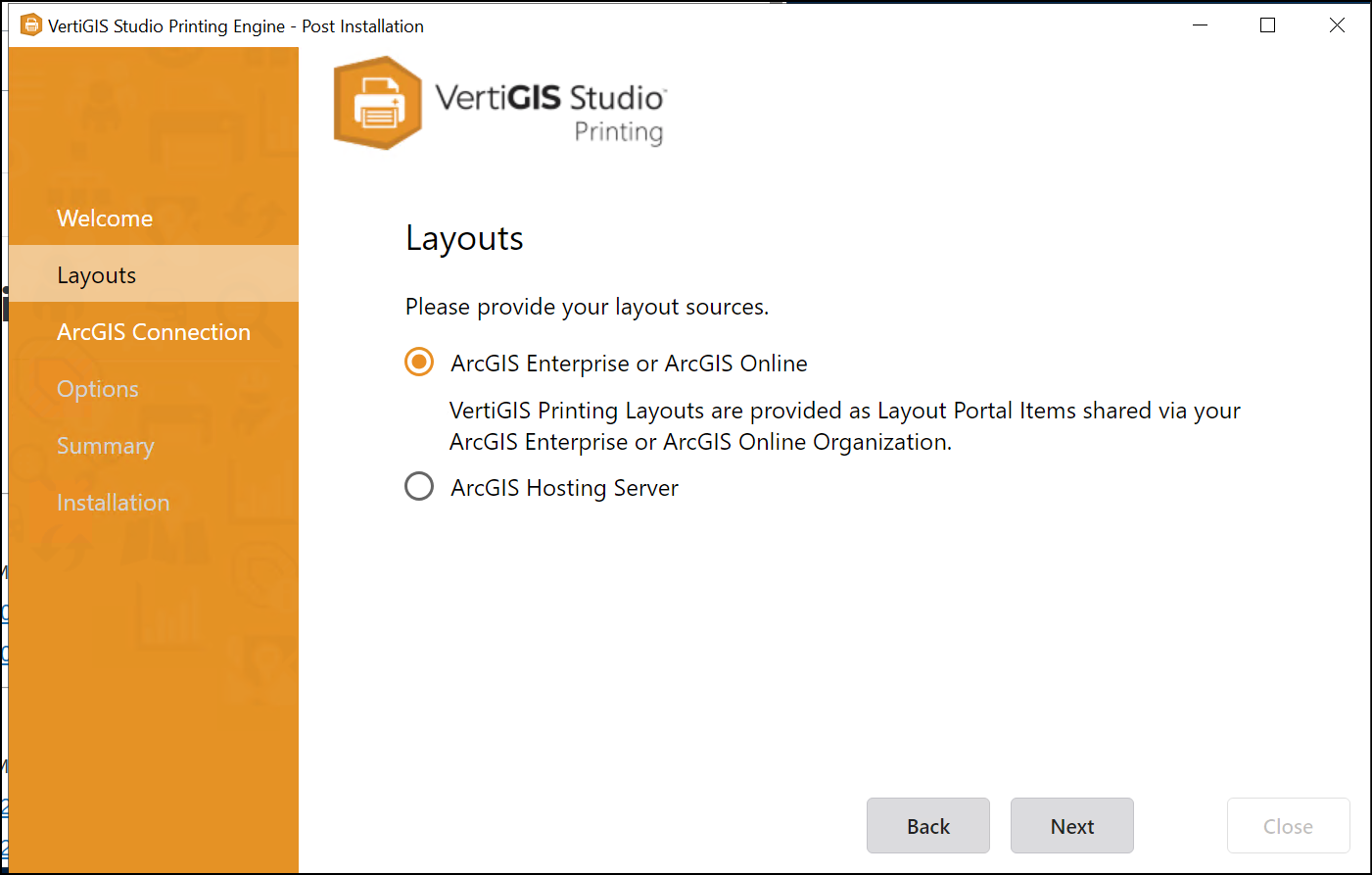
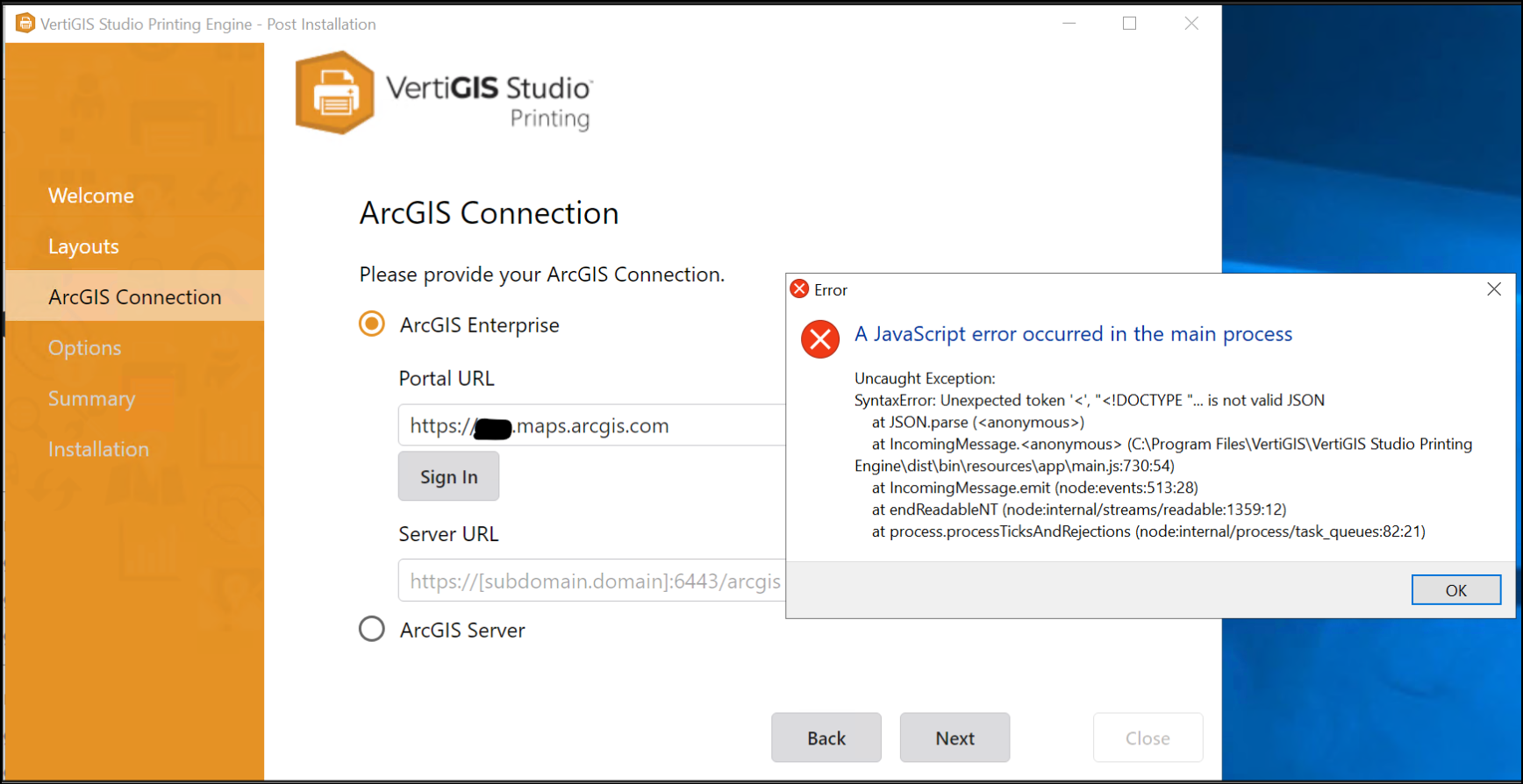
I've opened a support ticket (#141092) for this. Sorry if this is a strange place to address this particular issue.
0 -
Thank you, Jakob, for clarifying. It has been confusing. We are currently using Legacy printing but are now reviewing the process to change to Studio Printing because our users expect the print to a specific scale. Users have been alarmed at the random scales that are appearing.
0 -
@Alex St. John (#141092)
The issue you reported regarding the installer appears to be related to the specific environment setup.
Deploying the ArcGIS Pro–based VertiGIS Studio on a stand-alone ArcGIS Server (without an on-premises ArcGIS Portal) is possible, but it requires additional manual steps.
Details can be found here and specifically in the section “Option B” of this article.The PAGX layouts can then be stored in and be consumed from ArcGIS Online.
We can assist you in obtaining the required SD file (service definition) without running the installer, which is primarily intended for deployments to a local ArcGIS Enterprise environment.
@Carmen Durham
Upgrading to Studio Printing based on ArcGIS Pro is the recommended approach to take advantage of the new functionalities, including the recent fixes related to print scales.
I apologize for the unintended regression in the Studio Web App Builder, where the settings for fixed print scales were incorrectly displayed in the section for Legacy Printing. This configuration is only functional for Printing based on ArcGIS Pro.
These settings will be removed from legacy Printing in the upcoming release to prevent further confusion.0
Vous devez vous connecter pour laisser un commentaire.
Commentaires
17 commentaires