Handheld app "loses" map buttons after workflow panel is opened

I'm diving into the world of designing apps for handhelds. I've run into a problem that when I open a workflow form in an panel to let the user type in something, the keyboard that pops up resizes the screen (both the map and the panel that houses the workflow). If you don't pinch in to resize the screen to its full extents, when the workflow finishes and the panel disappears, the map frame remains zoomed in, so you can't see the buttons on the map.
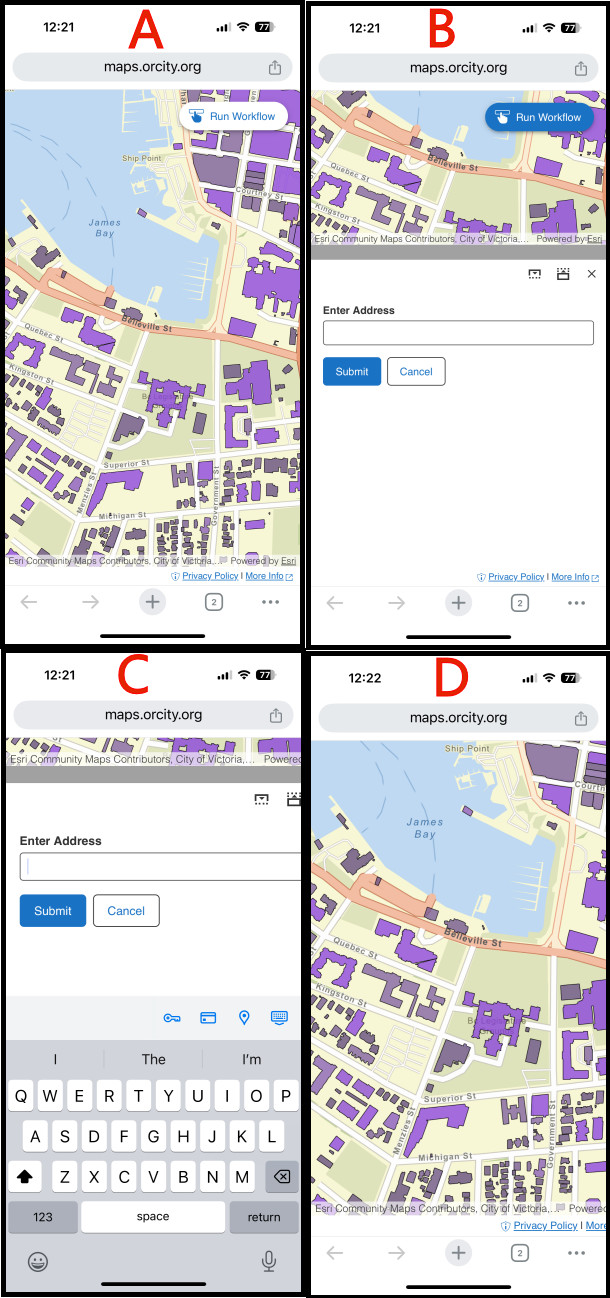
This image below shows what I mean:
A - the initial view on the phone
B - user has tapped the Run Workflow button and the form shows correctly in the panel
C - user is typing in an address. Note that you can no longer see the “x” control on the panel and the text box no longer is completely visible
D - user submitted the form and the panel has closed. Note you can no longer access the Run Workflow button.
How do I avoid this? I definitely need to solve this before we can publish handheld apps.
The app is available at https://maps.orcity.org/vertigisstudio/web/?app=53865e06b2764f438111e846b7959a90
Thanks!
Chris
-

Hey Chris
I took a brief gander at this, and noted:
- it looks like you are using Chrome on an iOS device
- I was able to reproduce this issue in Chrome on an iPhone 15 / iOS 18.2, though I also noted that Safari on the same device gives me the expected behaviour
I find this odd, as to what I know, Chrome on iOS is essentially the same as Safari in that it also uses WebKit as it's browser engine.
I took a quick look in our bug tracker and did not find this to be a previously known issue.
I would suggest reporting this as a bug (unexpected behaviour) to the VertiGIS Studio Support team. Please include the detail you mentioned here, as well as any version numbers (VSW, iOS, Chrome)
1 -
Thanks Gareth. I've submitted a support ticket, and I'll update this thread with the results.
0 -
This was actually a known bug (BUG-282207) that was being actively looked at at the start of the year. However, it looks like the fix didn't make it into the recent release (5.34.1). Hopefully it'll be a high priority item for the next release as it is delaying our implementation of Studio Web apps.
0 -
Hi Chris
Thanks for checking back. This bug has been resolved and will be included in the 5.35 release. The fix adds zoom detection for iOS devices that displays a notification when users zoom in on forms. Let us know if you have any questions once you've had a chance to test it in 5.35. Based on our product release cycle, 5.35 is targeted for an April 2025 release.
0
Vous devez vous connecter pour laisser un commentaire.
Commentaires
4 commentaires