Control field order in table

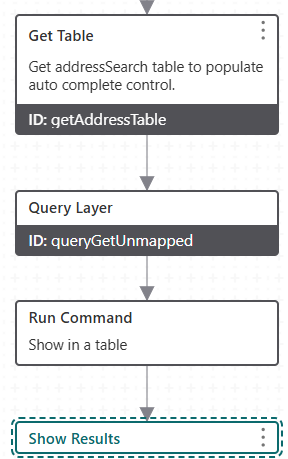
Hi. Is it possible to control the order of fields when displayed in a table? My workflow queries a service, uses a command - results.set-display-components to make sure results will display in a table and then ‘Show Results’ activity. The results are displayed as expected, but fields are in alphabetical order (see screenshot). I'd like to control the order but not seeing any way to do that.
Thx

-

The order of the fields in the comma-separated field list in the Output Fields Input parameter on the Query Layer activity?
https://docs.vertigisstudio.com/workflow/latest/help/query-task.html
0 -
Hi Nico. Thanks for the suggestion, but the order of fields in that parameter does not carry over to how the table is displayed.
0 -

I think that eventually the order is determined by either the service or the webmap.
0 -
I'm not seeing that. I have a couple of these WFs in different apps and the field order is always alphabetical. I guess it makes sense from a certain perspective, as it may be easier to find a particular field in a large table.
There is one wrinkle - sometimes, but not always, the field designated as ‘display field’ is the first column, and then it's alphabetical after that. Odd that it's inconsistent. In addition to my WFs, I'm testing this with results from identify operations. I can toggle between list and table using this button (below). It's the same - always alphabetical.
Curious if you are seeing different behavior?
Thx
 0
0 -
I checked again, and you're right, the order is not the same as in the mapservice or the webmap.
What I see is that the order is consistent between the database, the service and the webmap (I didn't modify it in Pro), and that the order of the table display in the viewer is different, but not alphabetical. The display field comes first, but after that it seems to be somewhat random.
0 -
Ok, thanks for checking Berend. Odd that the behavior is so variable. I'm running the SaaS version (latest) of VSW btw.
0 -
Another thing to look at is the configuration of the layer's ‘popup’ settings in the webmap. I just had an issue where a newly added field did not show at all in the table, and it turned out it was off in the popup's field list. Here, I could also change the field order
0
Vous devez vous connecter pour laisser un commentaire.
Commentaires
7 commentaires