Get Layer-List (Information) Activity
Non planifiée
We use several layer-presets. One specific layer is not included in all presets. I have designed a specific tool which should only be active if this layer is included in the current layer-list. Otherwise, the tool should show a message (eg "Layer not included"), and be deactivated.
To do so I need an activity to retrieve information about the layer-list, like “Get Layer-List”. This should include if a layer is included or not.
-

Hi Holger Frommer while I do not believe there is a workflow activity that specifically tells you whether or not a layer is present in the map, I believe you can accomplish this logic using the
findByLayerIdfunction that is available on the allLayerExtensions object.
Here's how you can structure the expression, likely in a Create Value or an If statement:$mapInfo.map.extension.allLayerExtensions.findByLayerId("YOUR_LAYER_ID") != null;
Explanation:-
$mapInfo.map.extension.allLayerExtensions:- Accesses the collection of all layer extensions in the current map.
-
.findByLayerId("YOUR_LAYER_ID"):- Searches this collection for a layer with the ID
YOUR_LAYER_ID.
- Searches this collection for a layer with the ID
-
!= null:- Checks whether the
findByLayerIdmethod returned a valid layer extension. If it’snull, the layer is not included in the current map.
- Checks whether the
-
$isLayerIncluded:- A variable or property to store the result of the check. It will be
trueif the layer is included, andfalseotherwise.
- A variable or property to store the result of the check. It will be
From there, you can use a few other workflow activities that determine the behaviour after that check is evaluated.
All that to be said, I do agree this could be a useful workflow activity. It could essentially wrap the logic described above.0 -
-
Hi Gareth,
Thank you very much. I wasn't aware of this possibility.
Unfortunately I can't get it to work. Since I found no proper documentation on the .extensions and .allLayerExtensions objects, maybe I can ask for further help?
I wrote a small workflow to test for the layer “Netzknoten”, showing an alert (true or false).
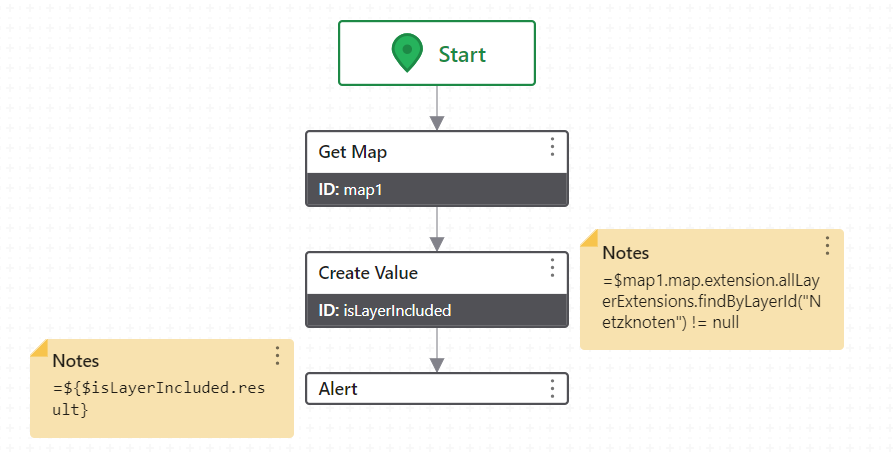
The result is always “false”, even though the layer is included in the map. Guess I can't use the name/string of the layer (like in the Get Layer activity)?
“Netzknoten” is a group-layer, by the way, and in the final workflow I would have to adress a sub-layer ("ZEB" or 0). Is that possible with the .findByLayerID function?
Thanks a lot in advance.
Greetings from Munich,
Holger
0 -

Are you sure Netzknoten is the actual ID of the layer, and not just the title?
0 -
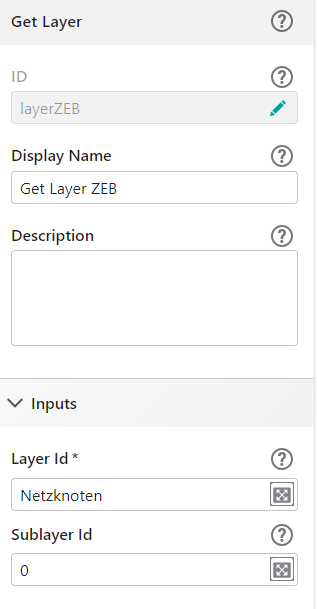
“Netzknoten” is one of several group-layers in the webmap. It is published with its sublayers in ArcGIS Pro as a map image layer. In the Portal, only the sublayers have an ID. The map image layer only comes with a “Service Item ID”.
In the Get Layer-Activity in another workflow, I can use the name of the group-layer, and the ID of the sublayer.
 0
0 -
If it's a mapservice, you should use the id of the service layer. The sublayer is the id of the layer within that service
0
Vous devez vous connecter pour laisser un commentaire.
Commentaires
5 commentaires