remove commas in Display Form

URL:
https://docs.vertigisstudio.com/workflow/latest/help/number.html
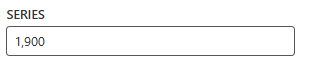
I'm trying to configure a workflow in VertiGIS Studio Workflow 5 where I need to display or process numeric input without commas (e.g., 1900 instead of 1,900). Despite trying multiple approaches, I haven't been able to achieve the desired result. Here's a summary of what I've tried:
Configuring Number Input with Custom Format
What I tried:
Set the Number Format to Custom in the Number Input activity and used the following custom formats:
0
####
0000
D (decimal format specifier for .NET numeric formatting)
Result:
None of these prevented the commas from appearing. The output still displayed values with commas (e.g., 1,900).
-

My coworker Umamaheswara Reddy Velupucharla came up with a solution for something he was working on. I believe he applied the formatting to the text box as the form loads.
When displaying numeric information in the VertiGIS Web App, text boxes automatically format values with commas as thousand separators. This enhances readability for users. However, when editing is completed, and the "Save Changes" button is clicked, these commas must be removed before saving the data in the backend.
To achieve this in the VertiGIS workflow, you can use JavaScript's replace function with a regular expression to remove all commas from the input value.


JavaScript
$ParkingLotForm.state.txtConstructionCost.value.replace(/,/g, '')


/,/: Matches all commas in the string.
g: Stands for "global," ensuring that all commas in the string are replaced, not just the first one.
'': Replaces each comma with an empty string (effectively removing them).
1 -

I believe this may be related to the way Number form elements behave as text boxes.
The solution Mike mentioned is one way to do it. Another may be to use a Parse Number activity to handle the form element output and use later on in your math function.
I found a basic example of a workflow that shows all math activity expressions here, made by our QA team.1 -

Johanne van Linge
0 -

I ran into this issue today as well.
The number field object will correctly follow the Custom or otherwise set number fields.
Of interest, theobject.value.displayandobject.value.numericproperties appear to be correct and usable as expected.
However, neither of these tend to update the actual value in the field for the end user! Which without something likeobject.labelor another similar property there just wasn't a good way to update what the user was seeing. =[
This is pretty important for numbers where we don't want to bother with advanced regex and don't want things like comma/decimal separators or all the other power of custom formatting. I'm not certain this is a bug or an oversight as I'm not sure what theobject.value.displayis for otherwise… but I'd love to have that be what the user sees so updating it would be like updating a textBoxlabelproperty as a simple option and we get all the power of the number fields without needing advanced regex for textBox fields instead.
The display property can even be updated with no visual effect, which feels unintended?1 -

The latest release of VertiGIS Studio Workflow (5.44) includes a fix for the “Fixed Point” format in VertiGIS Studio Web, which should produce the intended “plain” view of the number with no group characters etc. We also improved the support for regular expressions in Workflow 5.43.
1 -
Ken Lyon
Hopefully that also works for other options as well, as this all the options worked for theobject.value.display… but did not update the actual text in the number fields a user would see for any of the options like Fixed Point, Currency, Custom Format, etc...
At least in version5.40.1that I had tested in.
Thanks for the update! 👍0
Vous devez vous connecter pour laisser un commentaire.
Commentaires
6 commentaires