Run command ui.hide-busy-state not working as expected

Hi,
I am trying to use the pair of command ui.display-busy-state and ui.hide-busy-state in a VertiGIS Studio web application.
However, the ui.hide-busy-state command doesn't work as expected and the busy-state keeps showing. With the default Display Duration, the message closes after a while but not in response to the hide command. Even when I set maximumDisplayDurationMs: 10000 the hide command doesn't seem to affect the display.
I'm not sure whether this is a bug or I'm missing something?
The Commands and Operations reference doesn't clarify how they are expected to work together imo.
VSWF 5.42.0
VSW 5.32.0
Anyone having the same experience?
-

Are you passing the ID to ui.hide-busy-state?
0 -
Hi Berend,
Yes, I entered the following parameters for the “ui.display-busy-state” Command:
={
id: '1',
message: 'performing query',
maximumDisplayDurationMs: 10000
}and for “ui.hide-busy-state”
={
id: '1'
}I wanted to test the commands in the most basic WF where I simply query the Capital City service layer Water_Lines ('1=1' and all out-fields). And I am expecting the ‘hide’ command to close the message before it closes by configuration (after 10 000 ms).

BR,
Sander
0 -

Hm, I am able to reproduce this - I would suggest bringing this to VertiGIS Studio Support for troubleshooting and bug triage!
1 -

Hi,
Were you able to get ui.hide-busy-state command to work? I'm using it in a workflow, the busy signal is displayed via ui.display-busy-state but the ui.hide-busy-state run command doesn't seem to hide the busy signal which keeps showing.
Appreciate any help on this.
Thank you!
0 -
Hi Surya Rathanlal ,
I reported this issue to VertiGIS Studio Support and they filed a bug ticket 310134 for the Development Team. I couldn't find any updates via the VertiGIS Studio Change Logs however. So, it's not confirmed yet that the issue will be fixed anytime soon. Perhaps @... has more info?
BR,
Sander
0 -

In my experience the change logs are are not useful for VertiGIS Studio, as most bugs from the release notes are not in these logs.
1 -
Thank you for your responses!
Sander Van Raemdonck So did you end up using ui.display-busy-state command with timeout for your busy signal and hide after a certain time?
0 -

Nico Burgerhart I'm not really clear on the purpose of the change logs myself. It might be useful for some teams to track issues they wish to discuss with the public, but I don't use it for Workflow. I do make sure, though, that bugs fixed are listed in the release notes, including their work item id. This helps customers confirm a bug they discussed with support has been fixed in a given release.
1 -
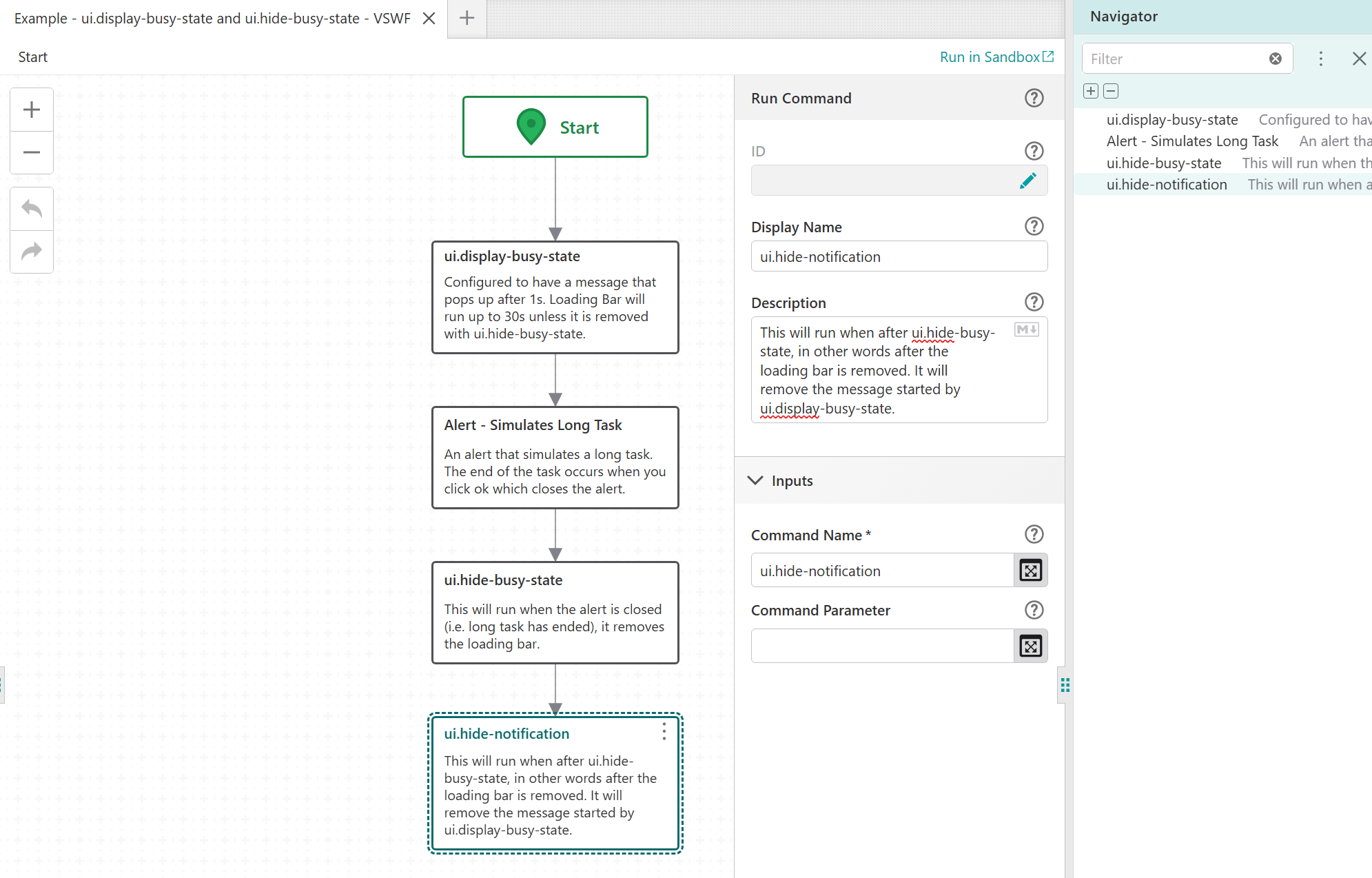
Hi Sander Van Raemdonck I noted that bug item had been closed “as designed”. The insight shared internally was that the ui.hide-notification command is necessary to hide the notification we are referring to.
I threw a quick example here: Example - ui.display-busy-state and ui.hide-busy-state - VSWF / Designer
1 -

Hi @...,
Thank you for the update on the bug ticket and the example. Good to know that the busy-state commands depend on the ui.hide-notification command.0 -
@... Thank you for the update and example, I was able to get it work!
0
Vous devez vous connecter pour laisser un commentaire.
Commentaires
11 commentaires