Studio Printing Frustrations

We've been trying to like VertiGIS printing for years now, but limitations have been hindering our implementation of it. The legend is one of the biggest issues. We've submitted ideas, asked for support, and have posted in the community regarding legend issues and it seems to be falling on deaf ears. Many of the ideas/requests in the community have been somewhat ignored. The legend still showing the symbology for imagery layers is maddening and is something that should not have been released. The ability to filter the legend elements was implemented with smart filtering, but it still isn't perfect and with the last release, has a bug with group items displaying regardless of the map settings. You cannot exclude image services from the legend either. Not being able to implement 2-column legend items when it's become so difficult to filter what's actually in the legend is also a hindrance.
I haven't attended a road ahead in a while, but perhaps someone could shed some light as to what is being done to address some of the issues with Studio Printing, especially with functionality in the legend.
For are still using Essentials web map viewers, but these issues don't seem to be unique to Essentials, as they are issues with AGO web maps as well.
-
Commentaire officiel

Hey folks – pulled together information for you from a couple of Road Ahead updates and some community posted information to create a clearer picture for you.
There are two generations of VertiGIS Studio Printing.
Gen1 uses print templates and the engine doing map generation is backed by Chromium.
Gen2 uses ArcGIS Pro layouts and the engine doing map generation is backed by an ArcGIS Enterprise geoprocessing service (ArcPy behind that).
Gen2 improves things in every way discussed in this thread. It produces better output (vector based rather than raster based). It is faster. It supports more recent Esri formats that aren’t supported in Gen1. It can deal with larger, more complex print jobs. It supports multi-page prints based on grids or line plots. This Gen2 VertiGIS Studio Printing and its integration into VertiGIS Studio Web is where our energy and focus has been for some time.
Meanwhile Gen1 has degraded. Unanticipated changes to Chromium over time have caused it to require more memory and rely more on GPU processing than when VertiGIS Studio Printing was introduced in 2019. The result is that larger or more complex jobs (that may have previously worked) are no longer reliably successful.
As of January 2025, Gen2 is only available on-premises. The VertiGIS SaaS environment is still running Gen1.
There was a commercial licensing barrier between VertiGIS and Esri Inc. preventing us from introducing the Gen2 technology into the VertiGIS SaaS environment. That barrier was removed at the end of Q3 2024.
Today there is a dedicated team at VertiGIS working on building a new VertiGIS SaaS infrastructure for the Gen2 VertiGIS Studio Printing. In addition to the completed Gen2 printing ‘engine’ we are making this new infrastructure scalable with printing demand.
As soon as this Gen2 infrastructure is ready it will be announced and made available. The Gen1 and Gen2 infrastructure will run side-by-side for at least 12 months to give you time to convert your print templates to print layouts (using an updated version of VertiGIS Studio Printing Designer), and to update your Studio Web applications to use those new print layouts.
-

I have not seen any significant improvement in printing and reporting for years and so I'd like to echo this request I can add a long list of issue expected to fix in printing (Saas) and I do have BUG number for most of them
- Printing fails in A2, A1 and A0
- Print does not includes the data uploaded by user like shapefile or csv
- Capability to have print series
- Real Smart Legend as you mentioned
- More config around Legend (multiple columns, respect frame and etc)
- Ability to customize overview map
- Print fails if it maps object exceed 4.2 MB we should have a way to exclude object to send printing to print out
- Imagery pixelates and blury, even screenshot is much better
4 -

I am also waiting to see improvements in printing, especially in legend. I have concerns to transit my applications from GVH to VSW with all these printing issues.
0 -

Add the ability to LOCK the vicinity map.
what good is this vicinity map?

All we want is to show where in the county the map is. That's it.
WHY does the vicinity map change scale?
2 -

Eric Kriener You can set the scale of the vicinity map in the Overview Map Picture Box Tasks but I can't prevent it from centering. (Update 6/6/2024: the overview map autocentering is by design according to support. “I believe this is by design, but we encourage you to post and/or comment in the Ideas section (https://apps.vertigisstudio.com/links/printing/ideas) - it looks like someone has already mentioned something similar here: https://support.vertigis.com/hc/en-us/community/posts/12334101009554-Overview-Map-Fixed-Extent-Graphic”)

 0
0 -

Hi Davood Kazemi , can you elaborate on the “printing fails for A2, A0, and A1”? I'm trying to print large sizes without the printing engine and they're turning up blank in the map box. Is that what you mean?
I'll echo the other concerns in this thread. With the Javascript API retirement right around the corner, I have to move our apps to VertiGIS Studio, but the core functionality of printing is my largest pain point right now.
0 -
Support quickly got back to me, looks like it's “a known bug, id 187546: Large format printing generates blank map image”
2 -
Hey Chelsea Rozek correct, printing fails to print map in A2 and larger
Although sometime in maps with limited number of layers, it works, I do have bug number for it but I couldn’t find in my history
0 -

Hi, having moved to the SAAS version of Web earlier than most, we're carrying out a user survey currently. It has become apparent immediately that printing is by far the biggest issue for our users. Reasons are as listed above by others, but particularly the general lack of reliability even with templates at A4 and A3 sizes. We are reliant upon the SAAS printing product and do not have an ArcGIS Enterprise setup as we are now ArcGIS Online only.
0 -
Peter Jackson can’t agree more
In our project people loved vertigis because ui flexibility of web and workflow capabilities to customize the process and printing always been the issue
Sometime it fails without any result
Sometimes it generate blank map
And if it works it too slow,
Legend always been a request to be able to customize
Not generate map in large size like A2 and A0
Print series like we have in arcgis pro
And etc
I hope we can have a map road around the vertigis printing improvement
0 -
I'm a bit disappointed by VertiGIS' silence regarding the issues we are coming across. Not only are our users losing trust, but as a GIS Lead, I am also considering using other products in the next project.
We are not in a position to install on-prem VertiGIS printing, and the SaaS VertiGIS printing only works randomly. In some cases, it doesn't generate maps at certain resolutions at all.
We reached out to the Woolpert Support team, but we ended up in an endless back-and-forth without a clear resolution. Initially, we were told it might be related to map size, so we reduced our map size from 3MB to almost 700KB. Still, the function is unreliable; sometimes we receive a "poison message" in the output, and other times the print fails due to a 404 error in the print log, which doesn't make sense as this issue seems completely random.
Our expectation is very reasonable—we simply expect to have a PDF whenever we use the print function, given the complexity of the map.
We are using VertiGIS Web and VertiGIS Printing (all SaaS), and any advice or workarounds would be greatly appreciated.
0 -
I agree, reliable PDF creation for optional printing is a very reasonable expectation. For us, it's a ‘must-have’, not at ‘nice-to-have’. The lack of any visible road map for improvements to SAAS Printing is extremely disappointing. The capability of users to create and print their own simple maps is one of the main drivers for us for using VertiGIS Web and Printing, removing a time-consuming workload away from our specialist GIS staff.
I was told in April that it is ‘unlikely but possible’ that there will be a SAAS version of the new Printing engine. The technology works but there are commercial / licensing issues with ESRI. It would be useful to have an update on this please.
0 -
I was also told about the possible SAAS version of the new printing engine out at UC, since I'm unable to use the new engine on prem due to not having a public facing ArcGIS Portal and all my templates are in AGOL.
Would be nice for an update on this and an actual product we could use.
1 -

Cam Barnard Is the latest release of VSP 5.25 considered gen1 or gen2?
I have it installed on-premises and registered with ArcGIS Online.
Should we expect to see the gen2 improvements in our environment?
1 -

Megan Ovenden
Hi Megan, Would you mind sharing how you were able to hide the imagery service from your map legend? I'm trying to hide some items in the legend that don't need to be included in the legend but is still visible on the map. That's how I came across this thread. I've installed the latest version of Print and the Print engine hoping there would be a fix but between my testing and what I've read here, these issues still exist.Thanks!
0 -
Kevin Fowler
You can try turning off the symbology in your ESRI Webmap
- Click on basemap > properties > show in basemap legend
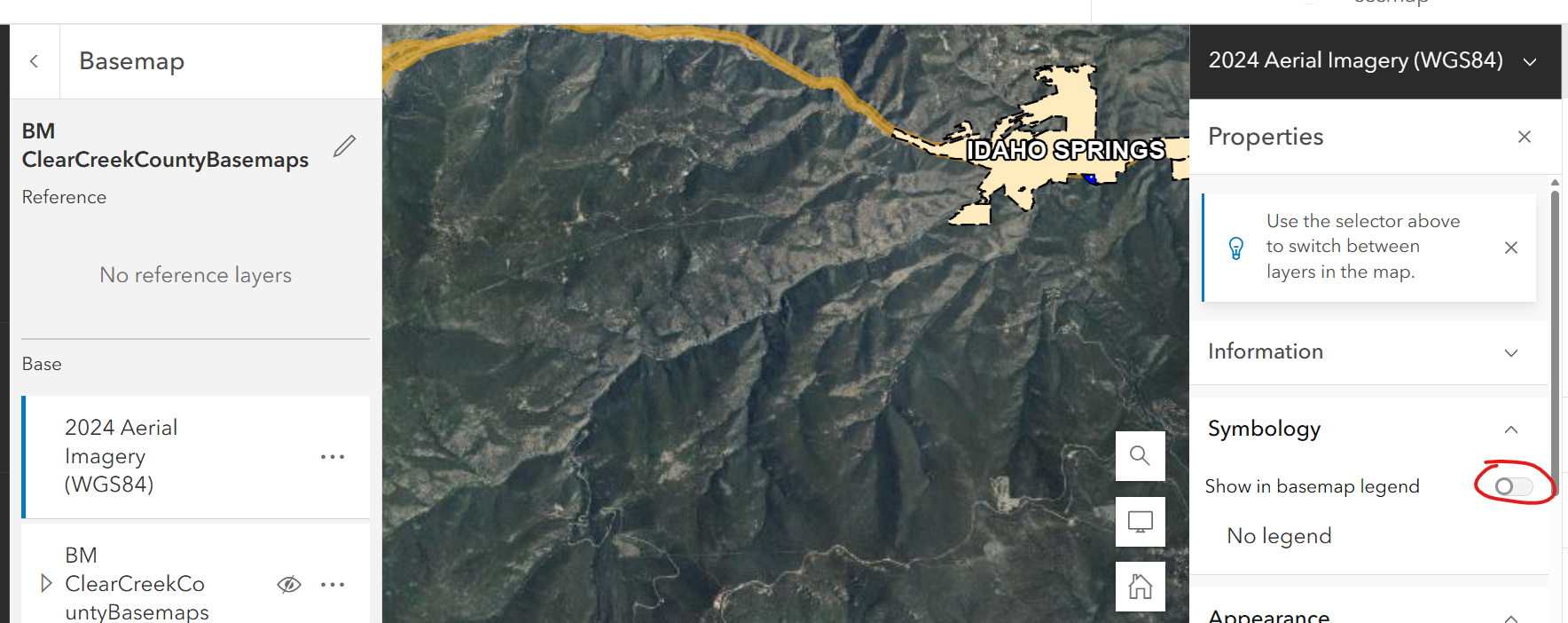
however following the upgrade to the new printing engine - I haven't found a way to turn it off - I submitted a support ticket 2 months and this was the response:
The issue with the basemap appearing in the legend is likely a known bug, though it's possible that it's as designed. I have made a note to discuss it with our Development team during our weekly meeting tomorrow to get some clarification on its status. For reference, it is in our system as 332330 and I have added you as a stakeholder.
Regards,
Megan
0 -
Megan Ovenden
Thanks for you're reply. I also submitted a support ticket after posting on this thread and got basically the same reply. It's frustrating seeing similar complaints to this from years ago with VertiGIS claiming they will address it in future releases but still have not.0
Vous devez vous connecter pour laisser un commentaire.
Commentaires
17 commentaires