Being able to hide version numbers module(s) used
Répondu
From an external security company who executed a (small) penntest on a GIS enterprise environment, we got feedback about the fact that a version number is listed under the user button.
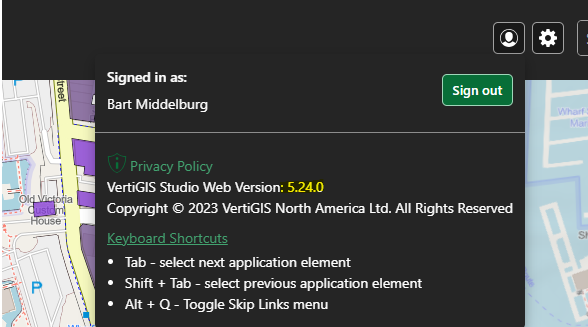
As this could potentially gives a user unnecessary information to find possible weakness of the software version. We can of course argue about the potential danger of this (small) finding. However, at some extent we agree that this is information that you should be able to hide to an end user. In an ideal situation you would have a switch in the designer to show or hide module versions, including in the console (see below).
From support we already got the response that you should be able to remove this specific listing via "language-privacy-web-version". So you should be able to remove the text by providing an empty string as the value for that key, or you could change it to a different value. Eg, you could use File > Download Translations, add a line to the file for and then re-upload it with File > Upload Translations. Or you could use the CTRL + SHIFT + E editor in Web Designer and add the line to the section of the app.json that has the language strings.
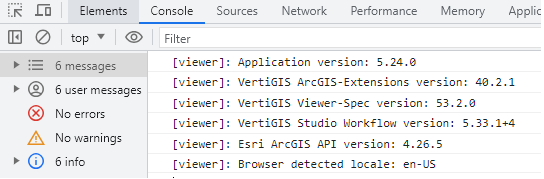
However still in the browser Console versions of a couple of modules are listed
-

This comes up from time to time, but even when it is identified it is always 'low risk'.
Bottom line is:
1. Someone can always figure out what version the product is via looking at assemblies, we are just making it a little easier
2. The value of being able to support the software (by knowing what version people are using) far outweighs any security risk.
0
Vous devez vous connecter pour laisser un commentaire.
Commentaires
1 commentaire