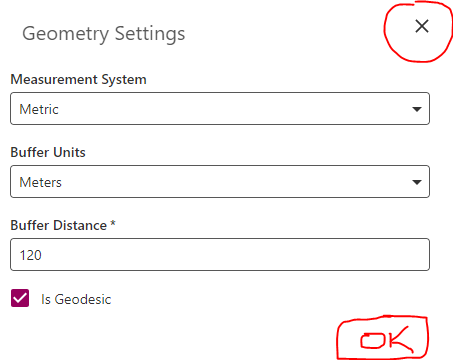
OK/Save button on Geometry Settings and Measurement Units menus
Planifiée
On VSW 5.24, the only option to close these menus is the x on the top-right. This can confuse users since they may not be sure if adjusted settings have been saved. An "OK" or "Save" button on the dialog is needed.
-

This feels very familiar ... I think we did it elsewhere and missed this spot.
We can't use OK or Save since the settings are applied immediately.
I believe we added a Close button in the other case.
0 -
A Close button or any kind of exit button would be a better indication to the user that changes will be saved (even though they are applied immediately). The x button to me signifies that you are closing the dialog without saving changes since this is the behaviour on most other software applications.
0
Vous devez vous connecter pour laisser un commentaire.
Commentaires
2 commentaires