How do you pick the "Map Service ID"?

Series 5ers -
I have multiple Map Services and I want to use the 'Set Layer Definition Query' activity. How do I tell it which Map Service to reference before using the Layer ID number? Wasn't there a 'Map Service ID' field in some of the old activities?
Cheers
Tom
-
Hi Tom,
You'll want to use the following configuration, assuming you're working with an Essentials HTML5 viewer:
Layer Id: use the Map Service Id -found from (Essentials Manager > Map > Edit Service) or the Essentials REST endpoint
Sublayer Id: use the Layer Id -found from (Essentials Manager > Map > Edit Layer) or the Essentials REST endpoint
I know this isn't very intuitive. I'll follow up here to make sure we're doing something about that, either in the property names or the tooltips/documentation. Thanks!
0 -
Hi Amanda -
Thanks for the fast response. I did try that and it didn't work for me. I also tried to put the numbers in single quotes as well (since it can take both a number or a string)
For example I tried the following;
Layer ID <I typed>
= 10
Sublayer ID <I typed>
= 0
And I also tried;
Layer ID <I typed>
= '10'
Sublayer ID <I typed>
= '0'
My expression was simply
'Layer > 2'
and I also tried
Layer > 2
I didn't see any results as I expected.
Personally I'd like to be able to copy and paste the Url into the activity. Less chance of mixing up the number, all I have to do is get the one url and I'm off and running.
Thanks
Tom
0 -
Hi Tom,
It sounds like it might be the expression that we need to check now, rather than the id properties. Does your specified layer have a number field called "Layer", where some features have values less than 2? An expression used here is similar to a Query activity's "Where" clause; it'll need to match up to your feature attributes. For example,
OBJECTID < 10
If that's not what we wanted to use the activity for in the first place, we can look for the right process to get what we want instead.
0 -
Ah sorry for the confusion but yes I do have a field named 'Layer'. I switched the expression to OBJECTID > 600 and I see no change in the results.
0 -
Hi Tom,
Thanks for the clarification! I don't think I can troubleshoot much further without seeing the site>map REST endpoint from Essentials and layer REST endpoint from ArcGIS Server. If they're public, you could share the URLs here and I'll be happy to take a look. I would also recommend confirming that the workflow is running correctly by adding in an Alert activity.
Otherwise I can at least provide an example that should work:
- Create a new blank site
- Add a single basemap, eg "World_Dark_Gray_Base"
- Add a second layer, http://agsdemo.geocortex.com/arcgis/rest/services/LosAngelesCounty/Dynamic/MapServer/0
- Use this configuration in your workflow:
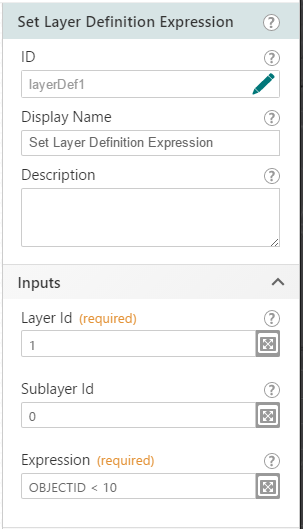
- Add the workflow to your site's viewer (IWT menu or toolbar)
- Open the viewer
- In the layer list, open the Layer Actions menu (>) for the Airports layer
- Click "Zoom to full extent", then "Zoom to visible scale" to get to an extent where you can see the airport features
- Run the workflow
- A bunch of the airports should be removed from the map display
0 -
Amanda -
I was attempting to set the Definition Query to the FeatureService. When I use the MapService everything worked as expected. Not sure why it would matter. Any insight?
0 -
Hi Tom,
When working with Feature Layers, you'll need to set the Layer Id to use the "Map Service Id" from the Essentials site, but you need to leave the Sublayer Id blank. Can you give that a try and see if it works for your Feature Service?
0 -
Thanks! That worked. How do you create a variable and use it to build an expression based on what was checked in a form? Example: I have 4 checkboxes in a form "North", "South", "East", "West". Based on which ones are checked, I need to build an expression for the Layer Def Query. Example: WELLCODE IN ('North', 'East') . I'd like to concatenate onto a variable: If checkbox3.checked then exp = exp + 'East' ....make sense?
0 -
Hi Tom,
I'm sure there are a few different ways to approach this, but I've attached one example that you can try. It uses a Check Group rather than a series of Check Boxes, which I think makes the most sense for something like this. But if you prefer to have four individual check boxes, you would just replace the For Each with a copy of its contents for every check box id (and change the inputs from the two activities to match).
0 -
Amanda -
Wow, you just saved me a ton of time....I wasn't even close with my thinking. Yeah your solution worked perfectly. I hope you guys have a course that teaches this level of complexity. I'd be all over it. I'm nominating you for internet hero of the day.
Thanks again.
Tom
0
Vous devez vous connecter pour laisser un commentaire.
Commentaires
10 commentaires