DisplayForm AutoComplete Hint Text; bug

There is a bug where the hint-text doesn't auto-remove
On the first load of the workflow, if your first click in the form is a mouse-click into an auto-complete the text will stay.
If you click again it'll disappear...
-

Hello Ryan,
Could you provide more information on the environment that you are seeing this issue in?
I have tried but was unable to reproduce this issue in IE11, Edge, Firefox and Chrome in GVH 2.9.1 and WAB in Windows 8.1.
Thanks,
Stefan
0 -
I tried on chrome and did not reproduce either...
The issue was on ie11
( Version 11.0.9600.18762
Update Versions: 11.0.45 (KB4034733)
)
If i go into f12 dev tools, it says (Edge) ...
GVH 2.9.0
0 -
Thanks for your feedback.
I'm using the same environment and still unable to reproduce. I suspect that this is an issue with the browser itself though.
0 -
Hi Stefan,
I think i figured my difference...
i have the query_string: &debug=true
Can you reproduce it in IE with that added to your url?
0 -
i noticed another 'first click' bug relating to auto-complete deleting input text, but again, only for the debug=true flag... not a production issue
0 -
Hi Ryan,
When I load GVH with the &debug=true flag, I'm not able to reproduce these issues either. Currently, this is the only place where that flag should be used; all other cases are not valid, as you mentioned.
Thanks, Stefan
0 -
So more oddities with my browser... Another of my group was able to reproduce the issues, and it can happen without the debug=true parameter as well...
Latest issue is populating a checkbox group with a subworkflow, i figured out if i supplied a collection of objects with 'label' and 'checked' properties it would select the item appropriately... but left side is my version of IE, and right side is Chrome...
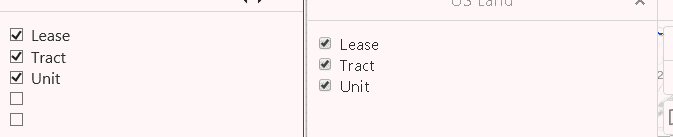
Is there anything I/we can review to figure the source of these issues?
0 -
forgot to attach checkgroup example wf.
0
Vous devez vous connecter pour laisser un commentaire.
Commentaires
8 commentaires