ShowResults tab names...

Hoping i am missing setting a property somewhere...
Using the 'ShowResults' activity multiple times, for different featuresets. It does work, but the tab headers are little slivers, it looks like they just have no names, so they're really small.
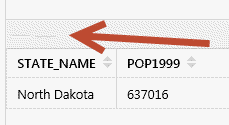
If you click them they work (hard to click)...
Is there a property i need to set to get tab names to show, this example the layers are not in my essentials site, but i was trying to set the map service id and layer id, and it had the same issue. <attached sample json wf>.
-
Hi Ryan,
Good catch. I tested on my end and found that the tab name does get populated if you're able to provide a service id and layerid or name that can be recognized. Everything looks right when that's the case. But if it can't find the layer in your site, then there's no name for the tab to use and it ends up looking tiny and flat like this.
I'm following up with a request that we look into adding a property to Show Results that would let you specify a name for the results- then the tab could appear correctly when the results you're showing aren't associated with any of your site layers.
Thanks for bringing this up!
0 -
I wanted to correct you, but i double-checked and you were right, i was not passing the MapService Id correctly, it is all good if you supply those two properties.
My actual problem is resolved, but it would be nice to pass in tab name as well.
Might be nice if un-matched logged in the GVH viewer...
0 -

Amanda,
Do you know when this issue would be resolved?
0 -
Amanada,
I really need this issue fixed for the Port of Rotterdam asap. Any idea when this feature is coming? I get data from SAP webservice and need the tabs. I tried an grouplayer to get a Tabname but the fields need to be the same. So that workaround does not work either.
0
Vous devez vous connecter pour laisser un commentaire.
Commentaires
4 commentaires