Set Layer Property Activity

Where can I find a list of layer properties that can be changed with this activity, along with their acceptable values??
-

Hello Mike,
I wasn't able to find a list of the available properties or their values, though you should be able to find the appropriate property by viewing the JSON of your layer. Note that not all of the properties are accessible, this depends on your specific map service and its settings.
Thanks,
Stefan
0 -
Stefan, can you be more specific when you say "by viewing the JSON of your layer"?
0 -
Take a look at a URL similar to http://YourServer/Geocortex/Essentials/REST/sites/YourSite/map/mapservices/1?f=pjson on your Essentials REST endpoint. There's a listing of properties for your map service.
For this map service, there's "id", "displayName", "shortDisplayName", "description", "connectionString", "copyright", "hasAttributionData", "serviceType", "serviceFunction", "baseMapGroup", "baseMapGroupIndex", "baseMapGroupIsMutuallyExclusive", "opacity", "visible", "initiallyVisible", "drawingBehavior", to name a few.
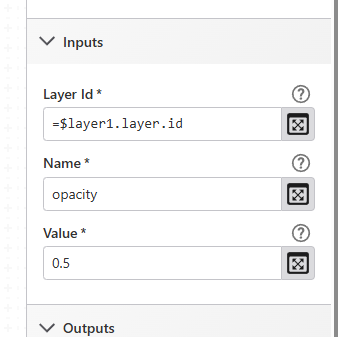
For example, if you wanted to change the opacity of the service, you'd use opacity as the Name and set the Value accordingly.
0 -
So, when I look at one of my map services/layers that I want to change?, I see below. Does that mean that I could use the layer property activity to change the "enabled" property for "featureClustering" and "featureHeatMap"? If so, could you share the syntax?
 0
0 -
Hello Mike,
My apologies but I sent you the wrong information; you are only able to set the layer properties of the Esri layer objects, not the Essentials ones. The list of potential properties can be found here: https://developers.arcgis.com/javascript/3/jsapi/featurelayer-amd.html
Not all of these properties will have a useful impact on the map or are supported.
Its not currently possible to interact with Essentials layer properties, like heat maps and clustering settings. The 'Run Command' activity can be used to execute commands that GVH supports. If you open the old Workflow Designer program and add a 'Run External Command', then click on the '?', you'll see a list of supported commands.
Thanks, Stefan
0 -
So not something that can be done with the basic layer property activity. So, until LG gets around to making an activity to access these Essentials properties, no way to do with GW5? Or if we pay to have made, how much would something like this cost? ? I supposes I could add all of the layers in there twice, once for each visualization, and then have the radio group choose between the layers...?
0 -

Hi Mike,
Perhaps we need to take a step back and look at the big picture problem you are looking to solve. It sounds like you want your workflow to be able to toggle on/off the heatmap and cluster visualizations of a feature layer. If this is the case there are commands in GVH that can do this. You could use the Run Command activity with the AddClusterLayer and AddHeatMap commands. These commands just need the ID of the feature layer as their parameter. More info on these and other visualization commands can be found here https://docs.geocortex.com/essentials/gvh/2.9/commands-help/#/commands/Visualization.
--Ryan
0 -

Found this works using a “Set Layer Property” widget in my workflow to modify the opacity/transparency of the layer - 0 = fully transparent, 1 = fully visible.
 0
0
Vous devez vous connecter pour laisser un commentaire.
Commentaires
8 commentaires