Using Windows Integrated permissions

With WF5 workflows that are used within a GHV, is it possible to set the permissions for users that have signed in through Windows Authentication? This is currently supported in GE workflows:
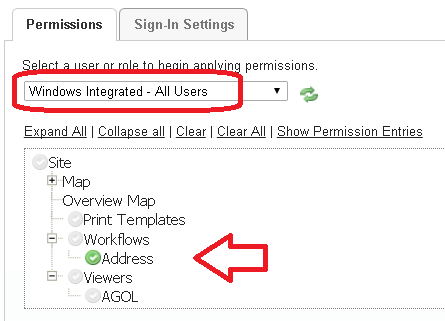
If not, would it be feasible to create a proxy .net web application that can be used to test if the user has signed in, followed by passing back the json of the workflow. In essence, the RunWorkflowByUrl would be configured to make a request to this web application, rather than directly to the workflow json file.
-
If there isn't a solution built into the software, I figured out another approach.
The GW5 workflow was downloaded and placed on our web server.
I then created a GE workflow with a RunExternalCommand activity, which runs the RunWorkflowByUrl command. This GE workflow was loaded into the GHV and had its permissions assigned accordingly.
Mike
0 -

Hello Mike,
You are correct, workflows can only be secured through ArcGIS-based authentication methods. There are currently no plans to introduce Windows Authentication support.
Thanks, Stefan
0 -

@Mike Diss-Torrance? We have worked around this with Workflow 4 by using the Get User Info command to limit what features can and can't be edited by a user (e.g. governments can only edit within their jurisdiction in a multi-jurisdiction application). It won't hide the Workflow but you can check if a user or role is allowed and otherwise prompt that they don't have permissions. I haven't tested in WF5 but I would assume it would function similarly.
0
Vous devez vous connecter pour laisser un commentaire.
Commentaires
3 commentaires