What kind of AGO permissions are needed to save Workflow5 workflows?

Hellow Workflow5 Community,
I've determined that my ArcGIS Online for Organizations "Administrator" account can open-up the new Workflow5 web designer and create workflows that I can save, but all other AGO accounts can't save their Workflow5 workflows. I unable to find documentation telling me what kind of ArcGIS Online permission Workflow5 needs to be able to create/edit/save workflows.
Does anyone have the answer?
-

Hello Steve,
In the documentation section called 'Share Workflows' (https://docs.geocortex.com/workflow/latest/help/Default.htm#wf5/help/sharing.htm), there are detailed steps on how the Designer enforces security between users.
Most likely, you will want to create a group containing all of the users within your organization you wish to be able to access and modify shared workflows, then set permissions on workflows that you create to be shared within that group.
Thanks, Stefan
0 -

It looks like only the Admin can create new workflows, but the admin can share with other collaborators from within an AGO group. Is that correct?
0 -
Erik, that is the crux of my question...can only "Admins" create new workflows?
0 -

To save a workflow as an item in ArcGIS Online you need to belong to the User role. http://doc.arcgis.com/en/arcgis-online/reference/roles.htm#ESRI_SECTION2_CB9BF0951AC647529EBB7CB09B8B3EDA
Specifically it is the "Create content" privilege that is required.
--Ryan
0 -
Ryan, thanks for the response. The user has "Create, Update, and delete" permission under Content but this user cannot "Save" a workflow.
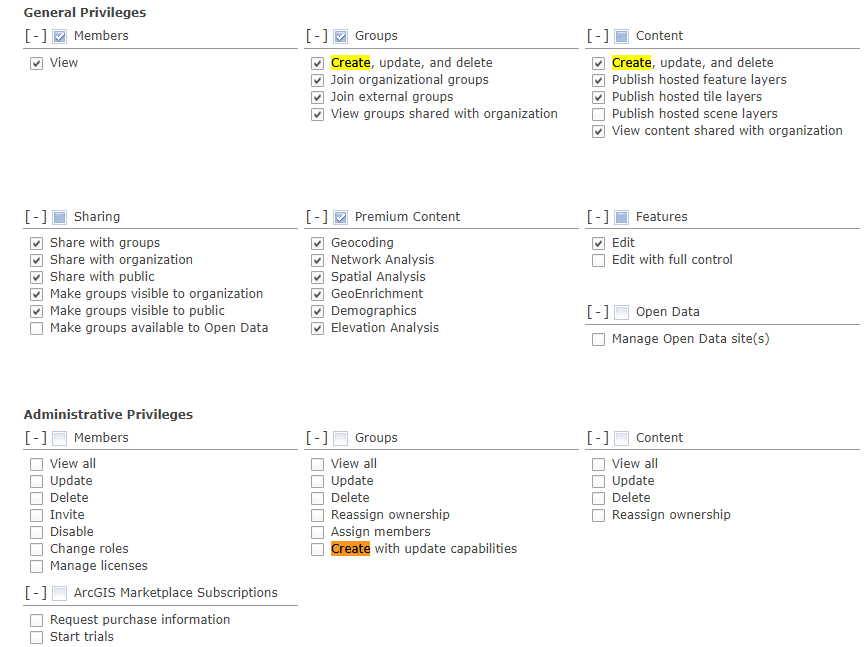 0
0 -
Hi Steve,
It looks like your users belong to a custom role. Can these users create new items directly from the "My Content" tab in ArcGIS Online?
--Ryan
0 -
Yes the users assigned to this role can create new items.
0 -

Hi Steve,
If you're still having issues with this, I would create a support case so we can take a look. It may be something we've overlooked in the implementation.
0 -
Jordan, I just checked and it seems the problem has been resolved. Not sure if resolved itself or if you guys resolved it, but I think I'm good. Thanks.
0
Vous devez vous connecter pour laisser un commentaire.
Commentaires
9 commentaires