I missing something with Delete Feature Activity

Hi -
I'm trying to use the Delete Feature activity and I keep getting the "Alert" 'The application is experiencing issues while performing this operation' message. I've isolated it to the Delete Feature activity. Yes, the target layer is editable. I have the correct features which I can show using the activity "Show Results". Am I missing something?
Thanks
Tom
-

Hello Thomas,
From what I can see, you should remove the single quotation marks around the Url. Since you are directly entering a URL and the input type of this field is a String, the entered value will be treated as a string, so the quotations are included, which in this case is invalid.
Thanks,
Stefan
0 -
Stefan,
That didn't work. "The expression contains a syntax error" and if I remove the '=' and just have the URL I get the same error I reported above.
Tom
0 -
Right, so you should just have the URL (e.g. http://agsdemos2.geocortex.com/arcgis/rest/services/LosAngelesCounty/LA_Editing/FeatureServer/0).
Can you confirm that the results from the Query Layer activity are successfully returned? This can be done by using a Log activity, with the input set to what you currently have configured in the Features input, then checking the browser's console (F12) for the output object.
Thanks, Stefan
0 -
Stefan,
Can we backup? I've been using urls successfully as; ='url'
in other workflows. What you are suggesting is going against the help in the Delete Features activity, shown here;
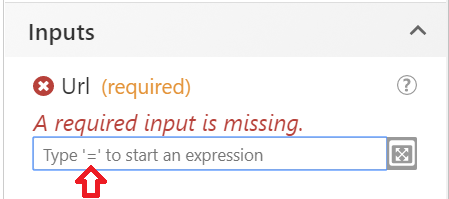
I can show the results of the Query Layer using the 'Show Results' activity. Would this be any different than the Log activity?
Thanks
Tom
0 -
Hi Thomas,
My mistake, you are correct, both ways to input strings are valid. I hadn't realized that you were using an expression for this input as it was hidden from your first image.
The Log activity method can be used to view the output object of any activity from within the browser console. Its quite useful when debugging issues.
If the results are selected by using the Show Results activity, then it appears as though you have valid results being returned.
Are there any errors in the browser console relating to the error that occurs when running the Delete Features activity? You could also try executing the workflow while running Fiddler and see if/what error message is displayed from the service.
I hope this information is helpful. Let me know if you are still having issues.
Thanks, Stefan
0 -
Stefan -
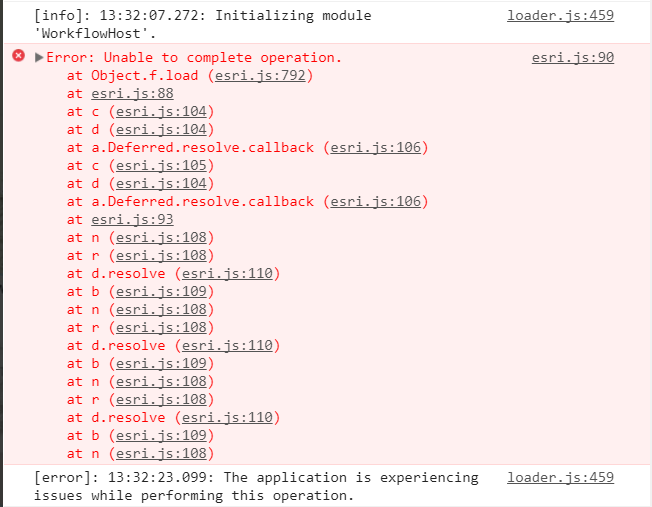
Is this what you mean by browser console and errors that occur? (This is pretty meaningless to me.)
This is a WF that I made to add features to the same feature service (adding works).

It made sense to me to swap out the activity "Add Feature" with the activity "Delete Feature". But it's not working.
Tom
0 -
Thanks for the info. yes that's what I was looking for. The error message itself is meaningless to me as well.
What might be happening is that the features that you are trying to delete might not exist on the layer or there could be a projection issue.
Take a look at the sample workflow that I recently created: GW5 - All Feature Editing Activities (https://latitudegeo.maps.arcgis.com/home/item.html?id=b2b1ae3e5f30482eb6bd2030d2a1fff4).
If possible, could you provide your workflow in order to me to look into the issue?
Thanks, Stefan
0 -
Stefan -
Thanks for the help but I couldn't mess around with the workflow anymore. I ended up pulling it out and documenting how to delete a feature using the native functionality. Not ideal, but it was accepted. I can't share the workflow since it has secured services. I used the Project Geometry and Query Layer activities and made sure I used the correct WKID for my area, in the Output Spatial Reference. The features added show up on the relevant layers in ArcMap. I also can confirm that I have selected the features by showing their results using the 'Show Results' activity. I just can't delete them.
Tom
0 -
Hi Thomas,
Sorry to hear that it didn't work out. Since you are using a secured service, you will probably need to append the token to your URL string. I've created an example of how to do this using the Get Layer and Parse URL activities.
Does the feature service configuration allow for deletion of features?
Thanks, Stefan
0 -
Does your feature have the 'OBJECTID' field? It was required before (both for update and delete) that the field was included in the feature.
?
0
Vous devez vous connecter pour laisser un commentaire.
Commentaires
10 commentaires