Is it possible to change the default error message to the user

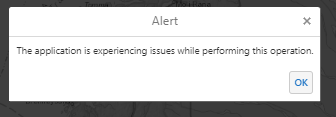
It seems that the default error message simply states that "The application is experiencing issues while performing this operation.".
Is it possible to alter this to either include a message to contact the administrator...OR, give some more details such as the need to sign-in with their AGOL account, or other details may be relevant to the particular issue?
Mike
-

Hello Mike,
Thanks for your feedback. This is currently not supported but I have created a task to revisit this error message and potentially allow editing the message.
Thanks, Stefan
0 -

@Stefan Schweigert? Please add DDS as a stakeholder for this functionality. Thx!
0 -

Stefan Schweigert I would also be interested in this functionality
0 -

It would also be helpful to mention this in the Ideas section to get a sense of how many people want this. That would help me prioritize it accordingly.
1 -

Hi, I'm picking up on this. Is this functionality still something that is explored at VertiGIS?
I have found 'some' entries in the Ideas section (for different VertiGIS products).
We are looking forward to be able to customize error messages in Geocortex HTML5 Viewer in particular.
But I believe it's a general request of more users over the whole product range...0 -

You can edit language strings in GVH e.g. the following string in Mapping.en-US.json, this is the error message for a generic error message.
"language-identify-error-message": "The requested operation failed. Try again later, or inform your application administrator of the problem.",
In the Dutch version of Essentials we use here
"language-identify-error-message": "Fout bij bevraging.",
0 -
I would also like to know where the VertiGIS Studio Workflow eror message below is defined.
The application is experiencing issues while performing this operation.
0 -
Thank you Nico Burgerhart for your input. Unfortunately, this message is not to be found in the Html5Viewer Locales. I have reached out to VG support to check if it would be possible to alter the message. Haven't got a definite answer yet.
In one of our applications, the message often turns up when there are connection issues to the services. If we could catch this error and return a custom message, prompting the user to reload the viewer, that would be an incredible improvement. Would that be possible to achieve with a workflow (running in the background) somehow?
0 -
Sander Van Raemdonck Which error message do you mean with 'the message'? The error on identifying?
0 -
I'm refering to this message:
The application is experiencing issues while performing this operation.
that shows up as an Alert pop-up:
 0
0
Vous devez vous connecter pour laisser un commentaire.
Commentaires
10 commentaires