Run GW5 at site open?

In the old workflow, we could go into Manager and associate a workflow with a site, and then we could run that workflow upon site open. Does GW5 work the same way??
-

Hello Mike,
This feature is currently listed in the Ideas section, please upvote and add a comment for this feature. (Enable the ability to run GW5 workflows on startup/login)
Thanks, Stefan
0 -
Would it be possible to run an old workflow at startup which would in turn run a GW5?
0 -
No, this is not possible and is not currently planned on.
0 -
I upvoted the idea, but that doesn't help me now... Could I put a link on the Home page to start a workflow? If so, could you give an example syntax??
0 -
Yes, you can do this using <a href="command:RunWorkflowByUrlAndInputs?url=https://YourOrganization/home/item.html?id=YourWorkflowID">Run Workflow</a>.
0 -
It is not resolving...
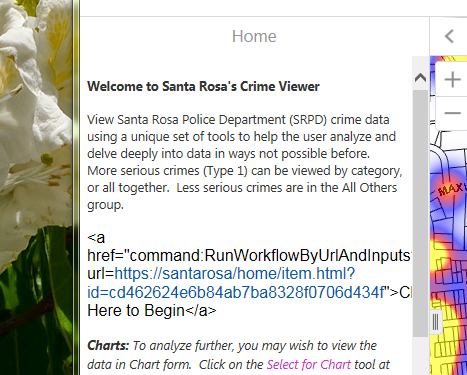 ?0
?0 -
It looks like you entered the configuration as text instead of in the HTML editor. In the text editor on the Home tab, click the button on the top right corner to 'Show Source', then add the configuration here.
0 -
Yes, feel like a ditz... It is working now. I ended up removing the visualization part for now, and while it works to launch from the Home page, it's certainly is not as clean as being able to launch directly at open.
https://maps.srcity.org/Html5Viewer/Index.html?viewer=PoliceViewer
0 -
Cool viewer Mike, I really like the use of the dropdown change events to provide quick inline help! That's something I hadn't thought to do before, but it makes a lot of sense, especially in a single-purpose application. Thanks for sharing!
0 -
Running workflows at startup is important to us too. I'm unclear how this was achieved here. The example url doesn't seem to contain the suggested text yet it does appear that it runs the workflow immediately upon startup. Would anyone be able to clarify how this was done? thanks!
0 -
If you are referring to my URL (PoliceViewer), what the user sees when the site opens is the Home page, with some brief intro remarks, and then a link (Click here to begin) that launches the workflow.?
0 -
Hi Rob,
Can I recommend that you add a vote and/or comment to the idea post at https://communities.geocortex.com/workflow/s/ideas#087f2000000fxTJAAY ?
We're watching this idea to gauge how important the feature is to users, so getting feedback through that channel would help increase its priority.
Thanks!
0 -
Until the GW5 startup workflow is available, you can implement usign GW4 workflow which contains one RunExternalCommand 'RunWorkflowByUrlAndInputs' with your GW5 url as the parameter, and set GW4 Workflow as the Startup workflow on Site, along with HomePanel (Mike H did) together so that you can launch GW5 workflow through HomPanel and also when GVH is launched too. This works only on GVH/and Essential Site (not WebApp application).
0 -
Yes, here is an example of a GW4 workflow being started at GVH open, and it in turn launches a GW5.
https://maps.srcity.org/Html5Viewer/Index.html?viewer=FireViewer?
0 -
Hi,
I'm trying to implement the work-around above, posted by Munhwan. It looks like the 'RunWorkflowByUrlAndInputs' command accepts an object parameter with properties including the url of the workflow and a collection of inputs.? Can anyone tell me how to create that object in WF4? An example would be great. I'm wanting to pass a couple of input params, like start_date and end_date.
Thanks
0 -
Hi Zorba,
Try this format in your Run External Command activity's parameters:
Newtonsoft.Json.Linq.JObject.Parse("{url: 'https://myworkflowurl',value1:'one',value2:2}")Then you can retrieve the values from GW5 as =$getWorkflowInputs1.inputs.value1 etc.
FYI, the code to run a GW5 workflow on startup (without a 4.x workaround) is ready to go. We're just waiting on a viewer release to make it configurable from Essentials Manager.
0 -
Thanks Amanda, that will be welcome! Will there be some WF5 examples for creating a parcel search as part of a url as well to allow zooming to a particular parcel at open? 0 -
That worked great. Thanks Amanda.?
0 -
@Amanda Frech? ,
Do you know if there is a way to trigger this new feature without the new viewer? Anyway I can hard-code something somewhere to make the workflow run on startup with the GVH210?
0 -
Hi Carlos,
You can set specific workflow(s) to always run on startup by hard-coding in the viewer's config file (Desktop.json.js). I've been asked not to post the configuration publicly; we're trying to make sure the documented method will be user-friendly. But if you'd like to email support I can send you the format for it.
0
Vous devez vous connecter pour laisser un commentaire.
Commentaires
20 commentaires