Viewer does not show Printing 5 template as a print option

I just installed Printing 5 on premises. I created a new template using the Get Started instructions. I shared the template with our ArcGIS Online organization and added it to our site in manager. The problem is that I cannot access the template from the Viewer. The 'Print' button in GVH is greyed out.
I thought maybe this might be permissions related since the template was only shared with our organization so I signed into GVH but the 'Print' button remained greyed out. I then tried sharing the print template with everyone in ArcGIS Online but this also did not fix the issue. I can access locally hosted RPX print templates just fine. Not sure what's going on here...
-
Are you running Geocortex Essentials 4.11 and Geocortex Viewer for HTML5 2.12 that were released last week? These include support for Geocortex Printing.
0 -
Thanks for checking. Yes, we're running GE 4.11.0.94 and GVH 2.12.0
0 -
Have you upgraded your viewers using the "Upgrade Viewers" button in the REST Manager?
0 -
I have upgraded the viewers, thank you.
0 -
Stumped here to.
Can you try Sharing the AGOL item publicly to see if it is just a permissions issue? You might also just create a quick test site and see if you can link it in there to see if it is something specific with your site?
We just migrating our DEV environment. Honestly haven't had as much time to play with Printing 5 as we've wanted.
0 -

What if you as a test configure an "old" RPX template? In earlier versions the Print button was greyed out when no RPX print templates were configured.
0 -
@DDS Technical Support? I had tried both your suggestions already. Not accessible when shared publicly or on an empty test site.
@Nico Burgerhart? I did try this, too. When I have both an RPX template and a Printing 5 template, the Print button becomes accessible but the RPX template is the only option.
0 -
Going to have to defer to LatGeo on this. I added an RPX template and both show up. I tried changing the load order and default report and it showed up every time. Let us know what you find out and good luck.
0 -

Is there any warnings or errors in the viewer console? Is it accessible when you ping the on-prem Printing server?
0 -
@Congrong Li? yes there is an error about failure to fetch metadata. See below. I submitted a ticket to Latitude yesterday and hope to have a resolution to share with you all soon.
 0
0 -
Ok, I have a solution to share thanks to @Mike Ketler? in Support. For some reason the REST Url that was generated for the Printing 5 template included an unnecessary parameter. The incorrect URL included "designer" but should have just stopped at "printing." See the image below. We fixed this by editing the Settings page for the item in ArcGIS Online. Removing "designer" from the URL fixed the issue.
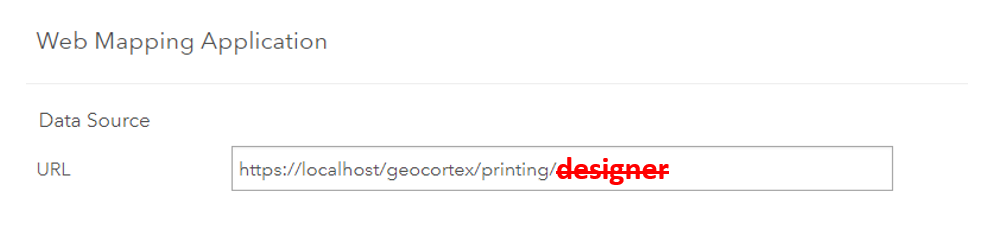
@DDS Technical Support? @Nico Burgerhart? @Congrong Li?
0 -
@Zachary Robinson?
Is this a generic issue or an issue specfic to your environment?
0 -
@Nico Burgerhart? Unclear right now. Mike said they're still building documentation for the product since it is in Beta. I wouldn't be surprised if it's specific to our environment since we had some issues installing the product in the first place. But I'd say it's something to keep an eye out for if you notice similar behavior.
0 -
I'm having this same issue. If i go and check the setting page of the print template in portal. I get. https://gis.bentonvillear.com/Geocortex/Printing/ but my print button is still disabled in viewer. I'm on 4.12 of both view and essentials.
0 -

I have a similar issue. I've looked to see if /Designer is included in the URL and it is not so the URL is correct. In my case it is to do with the browser the user is running. In IE 11.3143.14393.0 the print tool is greyed out if the only print templates available were created in Geocortex Printing 5. However the viewer runs OK in the latest versions of Chrome and Firefox and in these the print tool is enabled and the user can run the print templates created in GC Printing 5.
So the issue seems to be browser dependent for the user.
0 -

I am encountering this issue as well. Is there a resolution? I have checked my URLs / updated all browsers. The print button is still greyed out in my viewer.
I was in the process of updating my print templates and the new VPS worked totally fine. It was only after I deleted the older .rpx templates that the print button became greyed out. Any input would be greatly appreciated!
0 -

For future users with this issue - on a support call with Alex we were able to trace the issue to the site permissions, and it seems to be a bug that causes GE to not activate the button even though the templates were shared with everyone in AGOL.
They had permissions checked for Anonymous Access - All Users as below:
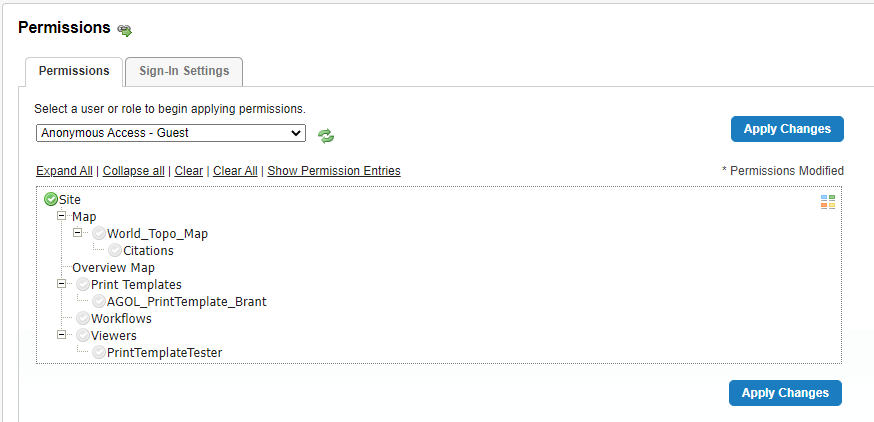
And the solution to get the AGOL print templates was to do one of either clearing all permissions for all user types on the site, or explicitly opening the permissions with a green check for AGOL - All Users (since their Essentials install is Federated with AGOL).
3 -
I believe this is bug 148342 and is indeed related with permissions to templates.
"The workaround would be to add one generic print template that everyone who uses the site has permission to access and make that one the default."1 -
Hi Nico - thanks for pointing that out. I've updated that bug ticket with the additional reproduction information from Alex's case since it presents a slight variation, but it is likely down to the same root cause.
1
Vous devez vous connecter pour laisser un commentaire.
Commentaires
19 commentaires