How do I turn off a layer on the map by default or set it's visibility scale, I'm pulling in some layers from ArcGIS Online and it seems that all layers are on at all scales.

-

Hi Cattyann,
Turning off a layer visibility or setting visibility scale can be done by layer settings in web map itself (i.e. AGOL Map viewer). Geocortex Web will respect these settings.
Cheers,
Pairin
0 -
Thanks
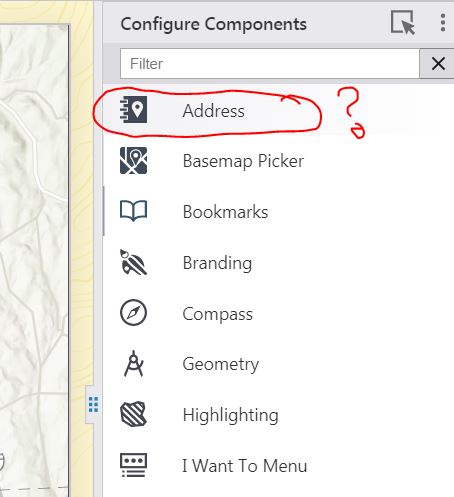
I have another related questions trying to configure searching and can't understand how to do this it's using the ESRI locator is there a way to configure to search a layer? Also what is the Address configuration for? Nothing in the documentation on what it is or does 😥 I'm using 5.1.
 0
0 -
Hi Cattyann,
Sorry for the confusion.
The Address component is for displaying reverse geocoded address at mouse point on map.
You can see the result by Right-click on the map, the address of the point will be displayed in map context menu. The configuration is for only changing title and icon, which will display when wrapping Address within a container (i.e. tabs, expand)
Search can be disabled/enabled a specific layer. You can do this via Layer Extensions under Map Settings.
Cheers,
Pairin
0 -
But you can't configure the layer to actually search a field in the layer on the Web viewer? Searches default to the ESRI locator?
0 -
I'm assuming that we would have to develop a workflow to return address results from the actual layer then...
0 -
Sorry for misunderstanding your need earlier.
Are you trying to configure your own geocoder service instead of using Esri World Geocoder?
Is your layer storing address data?
0 -
That's OK still making the leap in my brain from Essentials. I have a layer on the map with addresses yes and also the ability to use a more localized geocoder service. How can I do either of those?
0 -
Hi Cattyann,
Address-data layer and its fields should be searchable by default, but, to make sure, double-check search is enabled on the layer and fields you need (i.e. Map >> Layer Extension >> Field Extensions). If search still doesn't give the expected results, Please feel free to share me the layer via pmason@latitudegeo.com.
Localized geocoder service, you can switch the default Esri to use your own by manually editing app.json. This is an advanced functionality. I'd like to suggest you to create app backup before doing the follow:
- open your saved app in designer
- select "Deploy" in the left-side menus
- select "Download as Zip File" in 3-dot menu
- Edit app.json and re-zip both app and layout files
- select "Upload Zip File" in 3-dot menu
Cheers,
Pairin
0
Vous devez vous connecter pour laisser un commentaire.
Commentaires
8 commentaires