Sign in experience on MS Edge

I have a secured web viewer that requires an AGOL authentication (not portal). In other browers (chrome, firefox) I am prompted to sign in, then once i sign in the app opens perfectly.
However in edge, once I click sign it a new window opens to for me to sign in. Then once I sign in I get a message "The web page you are viewing is trying to close the window..." Once the window closes the original window I attempted to open the viewer in goes blank for a few seconds then returns with an error message. I am using the on-prem version 5.1 if that helps.
Has any one else experienced this type of issue? I've attached screen shots if that helps
-

Hi Shawn,
This appears to be a known issue, and we're currently waiting for Esri to address it on their end.
Kind Regards,
Pairin
0 -

Hi Shawn - we tried quite a few tricks to get this working properly in Edge, but unfortunately we were left with waiting on a small fix from Esri. We'll let you know when this gets resolved.
Cam
0 -
Hi Cam, no worries. Thanks for the assistance.
0 -

I'm still having this issue - has there been any update?
0 -
Steve Schunzel I just tried this on Master (what will be 5.18) that has the updated Esri JavaScript 4.23 API in it and I was able to get through the entire authentication flow in Edge so I think you will be in good shape soon. Having said that, I was also able to get all the way through the authentication flow on Edge with current production 5.17. What version are you running?
0 -
Thanks for the quick reply Cam! I'm using 5.17 of Web, Printing & Reporting, though we recently upgraded so there might be some 'residue' in the cache. Interestingly, Workflow is 5.27.1 and has no issue and stays logged in. I've tried clearing all browsing data and that still doesn't work. Any other suggestions?
0 -
Pairin Mason Any insight on why this might still be happening for Steve. I can't reproduce it on my version of Edge: Microsoft Edge Version 101.0.1210.53 (Official build) (64-bit)
0 -
Hi Steve and Cam,
After clearing the browsing data and reload, do you get the Esri sign-in popup to re-enter the credentials?
Are you seeing any sort of errors? What would the version of your Microsoft Edge?0 -
Thanks Pairin. Yes, I do get a prompt to sign in to my portal ('Sign In To...'), but it's not the same one that I get in Chrome ('Request for Permissions'). I also don't get any errors in the browser or in the Developer Tools. Everything loads fine, then after a few seconds it goes back to the Sign In page.
I'm using Version 101.0.1210.53 of Edge (latest version)
0 -
It sounds a bit like the login token being cached weirdly in your Edge.
Sorry Steve, to reconfirm that you did the all-time clearing for cookies and site data in Edge and that didn't help?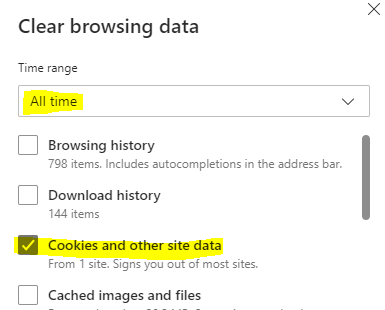
Are you signing into the Web Designer or just Web (outside of designer)?
Is it possible for you to record your screen of what you're experiencing and share with us?0 -
Completely agree with the strange cache in Edge, in fact I just opened a new InPrivate window and was able to sign on normally (why didn't I think of that before??). I do have a sync'd profile in Edge and maybe that is part of the issue.
I'm not sure it's worth troubleshooting further, but FWIW, I have cleared my Cookies & Images: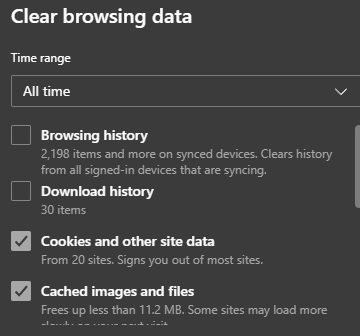
And I am signing into Web Designer (though it just says Web): 0
0 -
Thank you Steve for confirming those.
I agree the sync'd profile could be a factor. It's worth a try disabling the sync and see if it solves the issue for you.0 -
OK, I have signed out of my profile, cleared the cookies, restarted Edge and machine but no luck. I do have a workaround (Chrome or InPrivate windows). I will periodically watch this, especially after any updates to VertiGIS Studio or Windows. If anything changes, I'll report back. Thanks for your assistance with this!
0 -
No problem, Steve.
I'm sorry to hear that it didn't help with the issue. The last thing might be worth a shot is to reset Edge back to its default.
Settings >> Reset settings >> Restore settings to their default values >> restart Edge0
Vous devez vous connecter pour laisser un commentaire.
Commentaires
14 commentaires