How do I configure layout components?

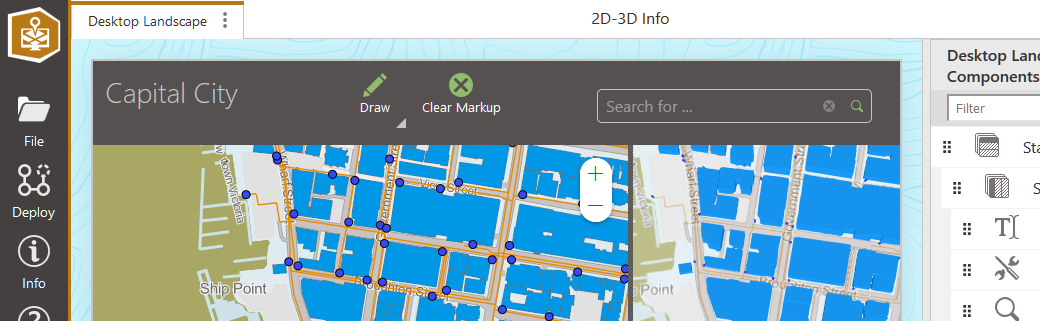
I've made an app with the '2D-3D Information Access' layout. I would like to add components which are only available in other layouts, such as a menu bar with an option to draw features.
I've attempted to add these items to the JSON of my app with no success. Does anybody know how to do this?
-

Hi Tom,
The best way to do this is to download the config files for the 2D-3D viewer you already have, and another one that contains the menu bar.
Unpack both config files, and copy the items you need from one xml file to the other, e.g. this line:
<toolbar id="toolbar-dca44164" config="toolbar-config-1"/>Could for instance go between the text and search tags, somewhere near the top of the file.
The following part is kind of tricky, but it may save some configuration work later, especially if you already have a toolbar with the items you want on it. It is optional though, so you can choose to skip it, in which case the viewer will have an empty Menu item that you can edit in the designer afterwards. Scroll down to the last paragraph to see how to apply the modified configuration to your viewer.
The toolbar item in the xml references an item named toolbar-config-1 which is in the accompanying app.json file. Search that file for toolbar-config-1, and copy the item to the target app.json.
{
    "id": "toolbar-config-1",
    "items": [
        "item://menu-item/drawing",
        "item://menu-item/clear-markup",
        "item://menu-item/identify"
    ],
    "title": "language-toolbar-title",
    "isLandmark": true,
    "$type": "menu"
},
Note that this item references other items (lines starting with item://). Those items will also need to be copied. Repeat until all references are satisfied, but make sure there are no duplicate id's. When I tried this, item://menu-item/identify was already included, so I had two items with id identify.
Pack the modified files into a new zip file and upload it into your existing 2D-3D viewer by clicking the ? button on the Deploy menu and then selecting Upload App Configuration. You will get a generic error message ('The JSON is invalid') if the json is really invalid, if item references are missing, or items have duplicate id's.
 0
0 -
Thanks a lot Berend!
0
Vous devez vous connecter pour laisser un commentaire.
Commentaires
2 commentaires