Report json data source at run-time?

Is it possible to use json as a data source for a report? Similar to the example at the following link.
In a workflow, I was hoping to pass a dynamically constructed json string through parameters on the "Run Report" activity. That json would then be used for the main report or for sub reports.
-
The Devexpress example now validates with a newer version of reporting. Is it possible to load the json data using the Report_DataSourceDemanded event?
The Devexpress example load the data when creating a report, which is different. But the documentation also states: "At runtime, you can set the DataSource property (or change its value) in the XtraReportBase.DataSourceDemanded event handler."
However, I've been unable to access that data using the expression field on form objects like label. Tried a couple different expressions: [Customers.CompanyName] and [CompanyName]. These return nothing.
public static JsonDataSource CreateDataSourceFromText() {
var jsonDataSource = new JsonDataSource();
//Specify a string with JSON content
string json = "{\"Customers\":[{\"Id\":\"ALFKI\",\"CompanyName\":\"Alfreds Futterkiste\",\"ContactName\":\"Maria Anders\",\"ContactTitle\":\"Sales Representative\",\"Address\":\"Obere Str. 57\",\"City\":\"Berlin\",\"PostalCode\":\"12209\",\"Country\":\"Germany\",\"Phone\":\"030-0074321\",\"Fax\":\"030-0076545\"}],\"ResponseStatus\":{}}";
// Specify the object that retrieves JSON data
jsonDataSource.JsonSource = new CustomJsonSource(json);
var root = new JsonSchemaNode();
root.NodeType = JsonNodeType.Object;
var customers = new JsonSchemaNode() {NodeType=JsonNodeType.Array, Name="Customers", Selected=true };
customers.AddChildren(new[] {
new JsonSchemaNode(new JsonNode("CustomerID", true, JsonNodeType.Property, typeof(string))) { DisplayName = "Customer ID" },
new JsonSchemaNode() {
Name = "CompanyName",
Selected = true,
NodeType = JsonNodeType.Property,
Type = typeof(string)
},
new JsonSchemaNode(new JsonNode("ContactTitle", true, JsonNodeType.Property, typeof(string))),
new JsonSchemaNode(new JsonNode("Address", false, JsonNodeType.Property, typeof(string)))
});
root.AddChildren(customers);
jsonDataSource.Schema = root;
//Retrieve data from the JSON data source to the Report Designer's Field List
jsonDataSource.Fill();
return jsonDataSource;
}
private void Report_DataSourceDemanded(object sender, System.EventArgs e) {
this.DataSource = CreateDataSourceFromText();
this.DataMember = "Customers";
}
0 -
Working Solution
Reporting Version: 5.5
Summary
Pass custom json from workflow to report and use a json array as the record list for the report.
Note
In version 5.4 and 5.5 opening Behavior > Scripts throws errors and fails to load the event drop down lists. Avoid that area if that is happening in your designer. Adding events through the script window works in 5.5 and the events fire when the report runs.
Workflow Create Value
Drag "Create Value" into the workflow from the toolbox and set the expression to the following:
={
"reportName":"Wildfire Test Report",
"fruitItems":"{\"fruitItems\":[{\"name\":\"Apple\",\"price\":100},{\"name\":\"Pear\",\"price\":200},{\"name\":\"Orange\",\"price\":150},{\"name\":\"Grape\",\"price\":120}]}"
}
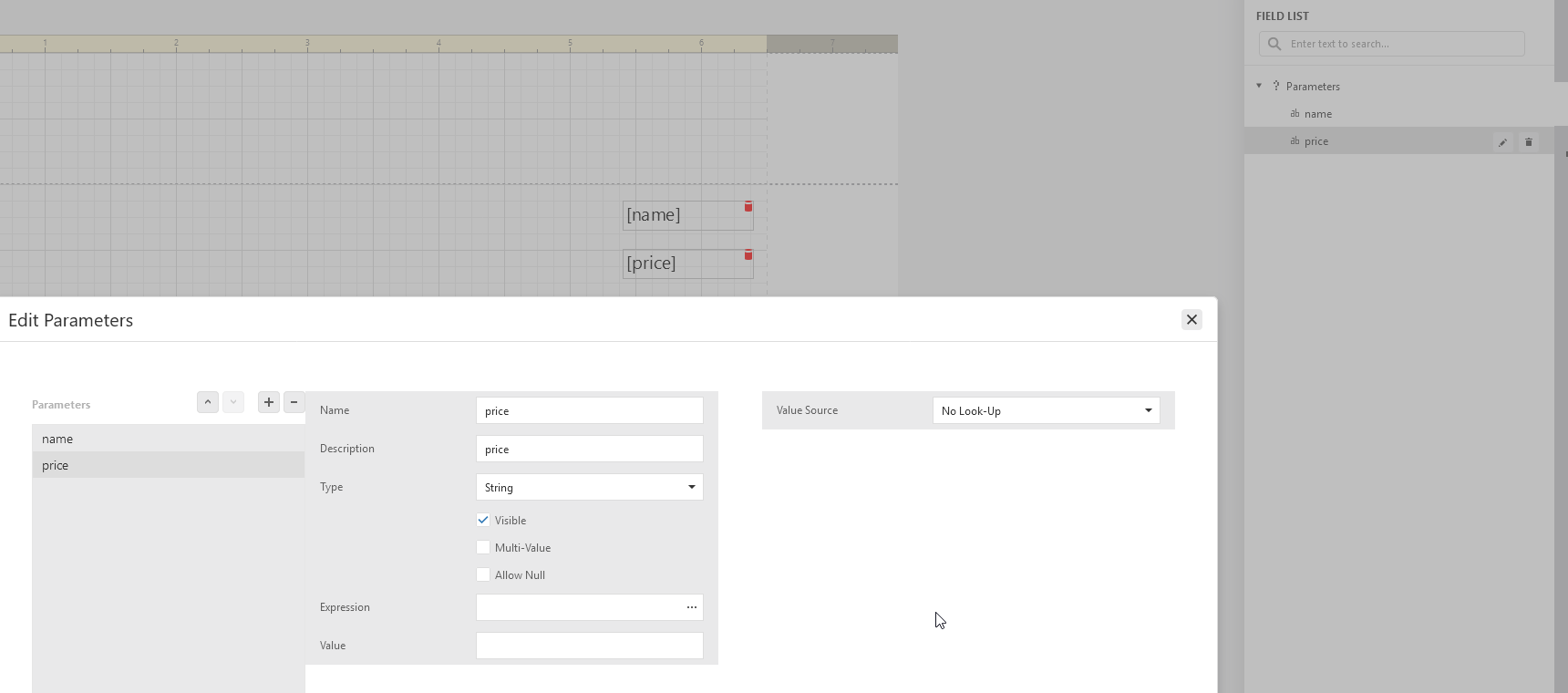
The root names of this json object will match field parameter names in the report designer. The values must be strings, haven't found a way to pass a json object at this time.
Report Data
Add matching field list parameters in the report designer. Field list right side bar button > Parameters > + (to add a parameter). Set the parameter name to match the name in the json above and set the type to string.
Report Data Source Demanded
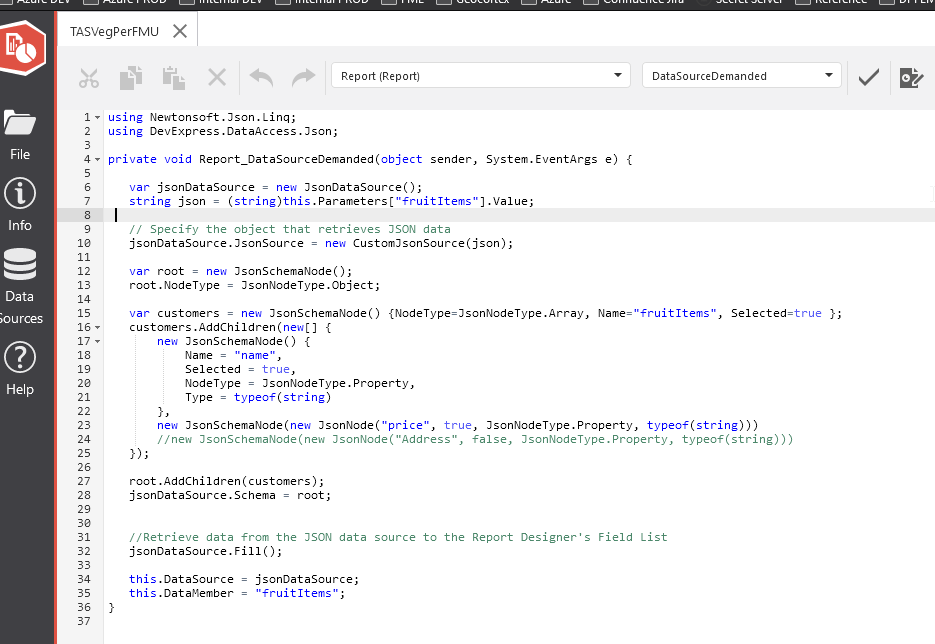
Click on the script button of the main report and add the DataSourceDemanded event. Script > Report > DataSourceDemanded. The script is below.
using Newtonsoft.Json.Linq;
using DevExpress.DataAccess.Json;
private void Report_DataSourceDemanded(object sender, System.EventArgs e) {
var jsonDataSource = new JsonDataSource();
string json = (string)this.Parameters["fruitItems"].Value;
// Specify the object that retrieves JSON data
jsonDataSource.JsonSource = new CustomJsonSource(json);
var root = new JsonSchemaNode();
root.NodeType = JsonNodeType.Object;
var customers = new JsonSchemaNode() {NodeType=JsonNodeType.Array, Name="fruitItems", Selected=true };
customers.AddChildren(new[] {
new JsonSchemaNode() {
Name = "name",
Selected = true,
NodeType = JsonNodeType.Property,
Type = typeof(string)
},
new JsonSchemaNode(new JsonNode("price", true, JsonNodeType.Property, typeof(string)))
//new JsonSchemaNode(new JsonNode("Address", false, JsonNodeType.Property, typeof(string)))
});
root.AddChildren(customers);
jsonDataSource.Schema = root;
//Retrieve data from the JSON data source to the Report Designer's Field List
jsonDataSource.Fill();
this.DataSource = jsonDataSource;
this.DataMember = "fruitItems";
}
Report Labels
Finally, return to designer view and add a couple labels to the Detail1 band. Change the label expression to match a name defined in the schema script.
Label1 expression value: [name]
Label2 expression value: [price]
The report designer will show a red warning because [name] and [price] are not defined using the data source wizard. The report still runs as those will be defined at runtime.
0 -

Hi Tyson,
I don't seem to be able to reproduce with reporting 5.6.0. Have I missed anything?
Produces a blank report page.

 0
0 -
@Richard Webb?
The json array object parameters are not defined within the designer UI. They are defined in the script described in this thread. To use the parameters defined in the script use a json object name with brackets on a label control.
- Add or click on a label control
- Click the "f" on the right side of the designer.
- In the Text field add the json field defined in the schema from the script. Like: [name]
- The designer does not know about these parameters at design time so it will show a yellow warning icon in the Text field input area, but the parameter will render when the report is run.
Just setup a sub report in Reporting Designer 5.10 and this method still works.
0
Vous devez vous connecter pour laisser un commentaire.
Commentaires
4 commentaires