Is it currently possible to change measurement.capture-geometry drawing result units say from yards to feet?

-
How does one know what option are supported with commands? Is this documented anywhere?
[
{
"name": "measurement.capture-geometry",
"arguments": {
"geometryType": "polygon"
}
},
"measurement.create-graphics",
"map.add-markup"
]
0 -

Hi Jake,
Regarding the changing units, currently, App Designer doesn't provide UI for the setting yet. The units can only be changed via editing app.json itself.
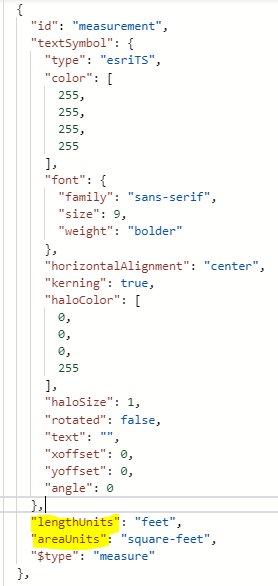
To see the options supported for commands, you can hit Ctrl+Space in App Designer's commands editor.
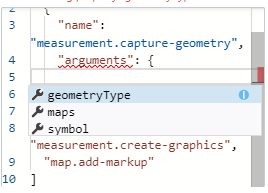
Kind Regards,
Pairin
0 -
I was able to download the app and update the json file fine. I then rezipped and uploaded app. The measurement tool worked fine in the designer I saved and took a look at the viewer and did not see to new units.
It seems that the uploaded config does not SAVE, and the settings reverted. Any ideas? My first time uploading modified config
0 -
There is a known issue where designer strips out the setting upon saving. The workaround is to edit app.json using https://ago-assistant.esri.com/ (search for your app via ID).
I apologize for the inconvenience.
Cheers,
0 -

@Pairin Mason? , Will this known issue be fixed ?
0 -
Hi @Melanie Duncan? ,
Yes, it's fixed in the latest 5.7.
Cheers,
Pairin
0 -
this feature isn't quite right in 5.7 The measurement unit default to yards when you're zoomed in. It would be ideal to have the ability to configure it to be feet.
0 -
Hi Jake,
You can use download/upload tool in Web Designer to configure the length & area units to feet as mentioned above.
If it doesn't work for you, please feel free to share your app.json to pairin.mason@vertigis.com
Cheers,
Pairin
0 -
I should have added - if you make that update as you've described above it breaks the new user preferences unit chooser feature as it hard-wires both metric and US to report in feet.
0 -
I see, the manual unit configuration directly in app.json is merely a temporary workaround for users to at least set the desire units.
We have a future plan to provide UI for configuring Measurement Units and have them working properly with the User preferences.
Sorry for the inconvenience and being unclear in my earlier comments.
Kind Regards,
Pairin
0 -

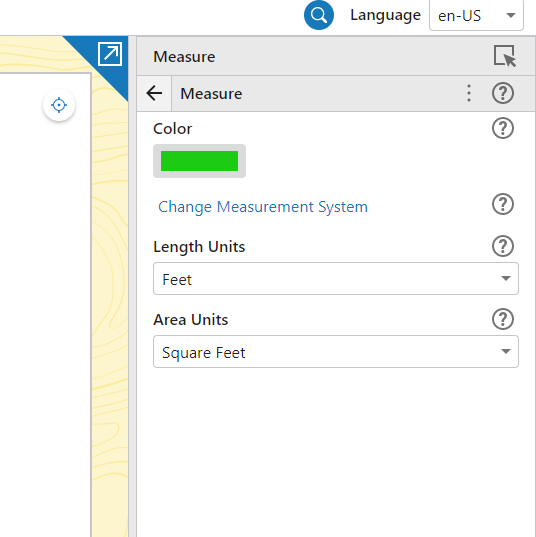
@Jake Brown? In case you haven't bumped into it yet. A Designer configuration interface allowing you as the app designer to set a fixed measurement unit, and also for your end users to adjust this as well was added in 5.10
0 -
terrific!
 0
0
Vous devez vous connecter pour laisser un commentaire.
Commentaires
12 commentaires