How do I use a custom theme / branding?

I want to use a custom theme for my Geocortex Web viewer. I tried doing this by copying the 'Light theme' section under 'branding' in the app.json. I pasted it underneath it, updated the 'id' and 'template' value and made changes to the color values.
After uploading my app, the new custom theme did not appear in the designer. Is there any way to do this?
-

Hi Tom,
Is it possible for you to share your app.json to pmason@latitudegeo.com?
0 -
Hi Tom,
Thank you for sharing your app.
Currently, the designer hasn’t provided UI for configuring a custom theme yet.
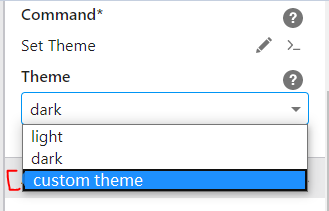
However, you can manually set the custom theme to be the default active one via "activeTheme" setting under "branding" in the app.json. And set "accentColor" and "template" settings to be null (please see attached app).
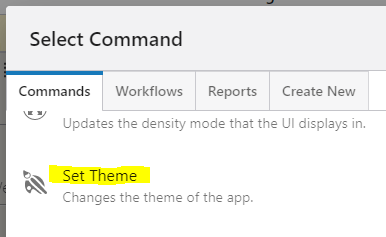
You can also switch to custom theme at run time by "Set Theme" tool in designer.
Cheers,
Pairin
0 -
Thank you very much Pairin!
0
Vous devez vous connecter pour laisser un commentaire.
Commentaires
3 commentaires