Why does the search in Geocortex Web only find objects that are in the map extent?

-

Hi Lara,
Currently that is 'as designed' in order to ensure that even with large numbers of layers search response times are acceptably fast. When we allow searching across the entire layer, folks tend to put in many, many layers, and then require faster response times than are possible when querying ArcGIS GIS Server.
A few things that we are working on:
- An exclusion for the geocoder
- An updated 'instant search' technology that pre-indexes content to allow for nearly instant searches on multiple layers, without extent limitations.
0 -
Can I turn it off so it searches the entire layer? If not is there a way to work around it?
0 -
@Lara Rector? In 5.11 (to be released Feb 10th) we revisited our search logic and made a number of improvements including finding an algorithm that would perform well and allow for items outside your current map extent to be returned.
See below for the note from the upcoming release notes.
"Significant improvements to the default search behavior. The algorithm was improved to allow for results outside the current map extent to be included. Results within the map extent will receive a higher ranking in the results. This change includes an adjustment to ensure that clicking on a geocoder suggestion gives you a more exact match."
0 -

@Cam Barnard?
It seems that I can't use the out of box search functions without adding quotes at either end? Is this by design? This won't work for users 😡... Also why can't we add feet as a buffer distance getting meters and km only...
0 -
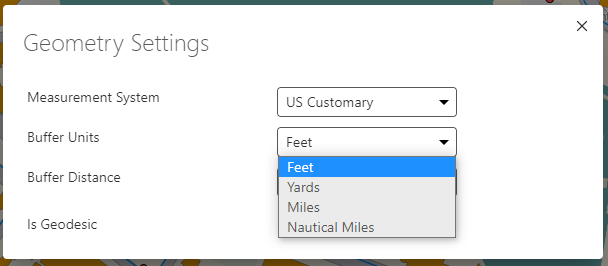
@Cattyann Campbell? ... are you running the latest 5.11 release? We made a ton of improvements to search in that release and I think it will work more naturally and as you expect. You shouldn't need quotes, and it also now searches outside your current map extent. For buffer distance, we pick up the locale the browser is using by default, but you can change the measurement system from auto detect to either metric or US customary manually ... once you change it and set it to feet that app will remember that for you as a user each time you use it.
 0
0 -
@Cam Barnard?
Thanks found the locale section but still no love for the search. Searches still mis-behaving 😕 and adding a different locator other than the ESRI one is also not working for us. The searches are fine on AGOL side but not in Web.
0 -
@Cattyann Campbell? ... suggest you open a support case related to search and our support team and our Web team will get to the bottom of what is going on for you.
0 -
Support request submitted… Cattyann Campbell Tompkins County ITS/GIS “Knowing where things are, and why, is essential to rational decision making” ~ Jack Dangermond, ESRI 0 -
@Cattyann Campbell? Did we get to the bottom of this for you?
0 -
We had to create a workflow for searching and submitted an enhancement for searching without quotes. According to support quotes are still required when using the search bar to return the address in whole and not in parts...
0 -
@Cattyann Campbell? If the address is part of map data then yes you'd need to encapsulate it in " " ... if the address is coming from a geocoder suggestion, clicking on the suggestion does the " " encapsulation automatically for you.
0 -
Would be nice to be able add a custom geocoder in this case ? Cattyann Campbell Tompkins County ITS/GIS “Knowing where things are, and why, is essential to rational decision making” ~ Jack Dangermond, ESRI 0 -
Hi @Cattyann Campbell? ... but of course you CAN do that! You can absolutely replace the Esri one with your own published geocoder.
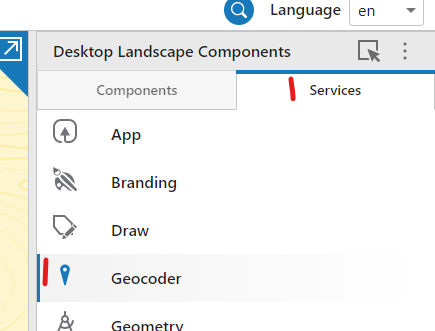
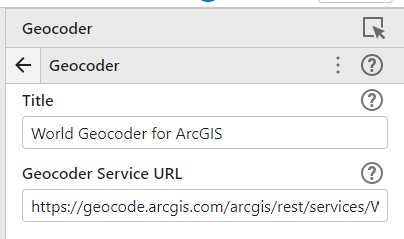
I don't think we currently support 'secured' geocoders, but otherwise you should be good to go.
0
Vous devez vous connecter pour laisser un commentaire.
Commentaires
13 commentaires