Print utility does not stick when added as a Component

I can "Add Component+" and drag the Print function into my list of components in web viewer. Once I execute that Print utility, it disappears from where it was visible in the map, where I run it from. It remains in the same place where I dragged it to. I have to delete the component and then re-add it to run the Print function again.
Seeing same behavior in 5.9 SaaS and 5.8 on prem.
-

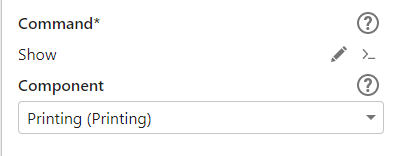
@Ryan Kelley? Did you ever find a resolution to this issue? The print component that shows up in your component list generally needs to be activated by something. Often a tool in the toolbar or a button on the map that calls the appropriate tool.
 0
0 -
Hi Cam. I actually did not figure this out, but I also set this down for several months. If I add a new Show command, I don't have an option to even pick the Print component, as seen in your screen cap. Do you have some more directions I could follow to see if this will work in our setup? Thanks.
0 -
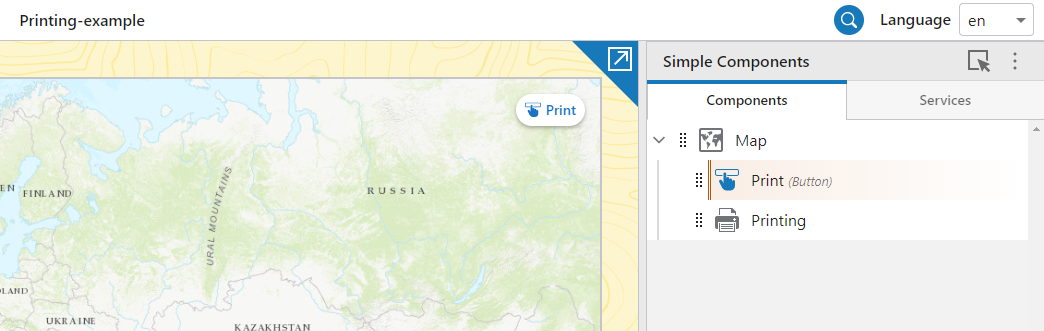
I've attached a simple app.zip that you can upload in Designer that contains only a map, a print component, and a button to activate it.
I don't remember what version of GXW it was that we added the dropdown to select the component under the Show command (previously you would have been presented with JSON to edit). It might be worth updated to the latest version of GXW before you pick this up again and start working on it.
0 -
Ok, that makes sense Cam. Thanks.
0 -

Thanks for asking the question. Would not have thought I would need to add a button to call the print function.
Cam - Are there other components that would need to use the show command to use them, or is this specific to the print component?
Thanks,
Chris
0 -
@Christopher Wiebke? ... good question!
As we built Web, we were aiming for maximum flexibility of application layout and design. Printing (preview) was one of the first things we added, and we realized fairly quickly that the pattern of "you need to include this component in order to make this command work" was going to be problematic.
The team worked together to come up with a set of guidelines and one of the patterns (that you now see a lot of) is that a command can have its own modal UI (e.g. measurement settings) that appears, captures input, and then goes away.
This makes it less likely to make a mistake.
We are planning in the future to have an optional 'target' parameter for these commands that when used will override the default 'modal dialog' behavior and allow the UI to appear in other locations in the application.
This solves 'most' of the problem. There may be future UI where you want it to be persistent (always visible) to the user, such UI component would have to be added to your layout or they wouldn't work.
Longer answer than you wanted, but that's the story :)
Cam
0
Vous devez vous connecter pour laisser un commentaire.
Commentaires
6 commentaires