How to set focus back to the form after highlighting the selected feature?

I had a form where a user can search by project. A list of assets associated with the project is listed in an item picker.When an asset is selected, the map zooms into the asset feature and highlight it. Unfortunately, my form disappears and the "Results:(..) form replaces it. I want to keep my form without having to navigate back to the form. How do I do that?
-

Hi Jenny,
First, just confirming we are speaking about Geocortex Web and not the Geocortex Viewer for HTML5. Correct?
Which out-of-the-box template did you use to start your app? Web GIS - Default?
What is your desired behavior?
It sounds like:
- bring up the workflow form
- allow users to click on an asset
- highlight the feature
- pan and zoom the map to that feature
- ... but leave the workflow form visible
- i.e. do NOT show a results list of assets
- do NOT show a result details view for the asset.
Would a 'side by side' view work well for you where your workflow stays visible but the feature details for the selected asset shows up beside it?
 0
0 -
It is Geocortex Web. I used the 2D-3D Multi Layout Template.
You got the behaviour correct. 'Side by Side' view would work as long as my workflow form does not disappear.
Can you also clarify the difference between highlight and set focus?
I notice that highlight draws a circle around the selected asset.
Only when I clicked on the asset, the marker shows up and the feature details are displayed.
Also, can highlight be applied to multiple assets selected?
0 -
OK ... your default layout looks something like this:
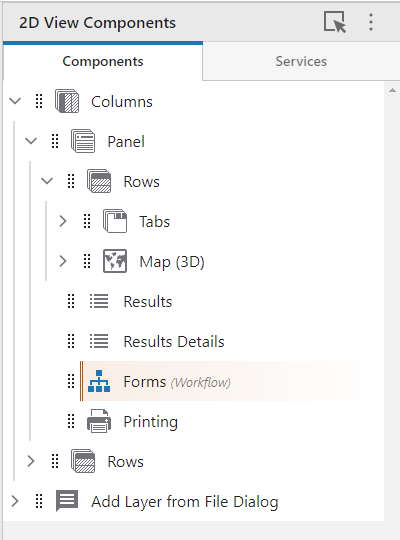 ... you can add a new panel, and put the workflow form in the new panel
 you can also configure the panel to remove its navigation/close and to hide it initially
 When you activate the workflow, it will appear on it's own with no back/close buttons. Depending on how your workflow works ... you may not want any buttons at the bottom.
To your question about highlight and focus ... they are both visual ways of indicating features on the map. They both support multiple features. By default highlight has no marker, and focus does (this supports accessibility which doesn't allow for a change in color only to differentiate two states).
You can re-configure both highlight and focus colors and markers in Services > Highlighting in Designer.
For additional information on how the viewer commands work that you might call from Workflow see:
https://developers.geocortex.com/docs/web/api-commands-operations-events#command-highlights.add
https://developers.geocortex.com/docs/web/api-commands-operations-events#command-highlights.clear
https://developers.geocortex.com/docs/web/api-commands-operations-events#command-highlights.remove
0 -
@Oh, Jenny? How did you make out with this?
0 -
Sorry I took so long to respond. Data is down so I cannot test this but YES, it worked. Thank you.
0
Vous devez vous connecter pour laisser un commentaire.
Commentaires
5 commentaires