Language of custom widgets in Web AppBuilder

Does anybody know how to set the language for the custom widgets in Web AppBuilder?
Even though the language of the ArcGIS portal (user profile) is set to Dutch the widgets still appear in English.
By the way, this question does not only apply to the Printing widget but to all other custom widgets that can be added to Web AppBuilder like Workflow and Reporting.
-

See also my question here on localizing the Printing widget https://communities.geocortex.com/s/question/0D55x00007iVbdtCAC/localizing-printing-widget?topicId=0TOf20000005vK8GAI&topicName=Printing
0 -
Ah, that's the same question indeed! :-)
0 -
So for Printing the interface texts come from a WidgetStrings.js file in the widget configuration. There are also some string.js files with texts. The current texts are only in English. An option would be to translate the text in these files.
For Reporting I expect the same configuration structure. For the Workflow widget I've seen the structure is different.
I've not found documentation on localizing Geocortex widgets.
There are options for localization of Web App Builder, see ESRI documentation.
https://developers.arcgis.com/web-appbuilder/guide/add-i18n-support.htm
0 -
Thanks for the information, Nico!
0 -

These cannot be localized at the moment, short of replacing all the English strings with your translated ones in those .js files. If you can supply us with a Dutch translation of these strings we can certainly include it in the product going forward.
0 -
Thanks for the offer, Ryan! We can deliver the Dutch translations for the strings for the widget.
0 -
@Ryan Cooney? I sent you translations today.
0 -

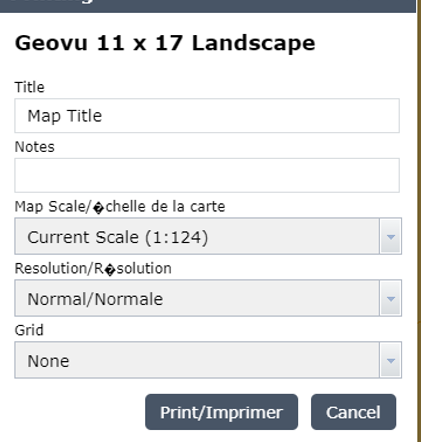
@Ryan Cooney, I added French translation to WidgetStrings.js but the french accents were not respected. I also tried the equivalent ascii codes for French letters with accents but it did not work either. I saw the literal rendering of the ascii codes insteac. Is there anyway I can get French accents to show properly in WidgetStrings.js?
 0
0
Vous devez vous connecter pour laisser un commentaire.
Commentaires
8 commentaires