Layer action which opens a hyperlink (metadata)
Répondu
Is there a way to add a layer action in VertiGIS Studio Web which launches the layer's item details page in the ArcGIS portal? Generally spoken, is there a command that can be added to the layer actions which opens a hyperlink to a web site?
-

Hi Marina,
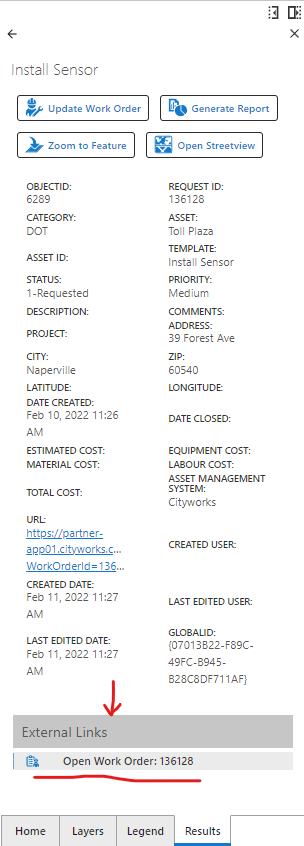
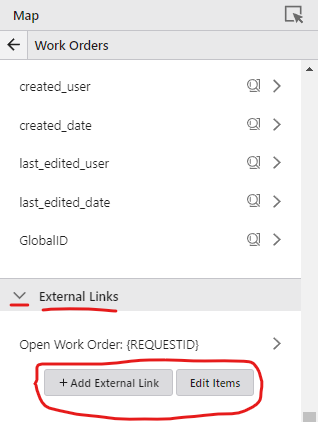
Yes, this is possible using External Links (Available as of 5.11).-
External links, also known as feature hyperlinks, are now configurable for each layer in a map component. External links support token representation of attribute data for the feature and location of the feature. This creates an effective way to link out from a Feature Details view to an external system with contextual data as part of the URL. Common use cases include opening a new browser tab showing street level imagery at the feature location, or opening an enterprise business system with the feature's ID already specified.
 0
0 -
-
Hi Patrick, external links are a good solution for layers that have already been added to a webmap. However, in this case it concerns a VertiGIS Studio Web application in which users add their own layers, so the underlying webmap is empty in the first intance. I suppose that these external links cannot be configured for layers that have been added by the user?
1 -
Correct. I'm not aware of any current approach to add an external link to a user-added-layer. With that said, we do have a user story to create an open-url VSW command (147186). This would allow you to configure a results details feature action (that works across all layers in the app, including user-added layers) rather than an external link (which have to be configured for each individual layer) to launch a url using the new command (or via a workflow that calls the command). It looks like we are targeting this to be available in the next version of VSW 5.17.
Hope that helps.
-- Patrick1 -
That sounds promising, thanks Patrick!
0 -

Did this come to fruition for user-added layers? I struggled to find it in release notes.
0 -

Hi Paul Conway yes, have a look at https://developers.vertigisstudio.com/docs/web/api-commands-operations-events#commands for system.open-url:
system.open-url
Opens a URL, either in the system browser or whatever app is appropriate for the scheme of the URL. If {@link Features } are included as context, then the URL may contain substitution tokens in the format {FIELD_NAME} where FIELD_NAME is the name of a field in the first feature in the context. In this case, the {FIELD_NAME} is substituted with value of the FIELD_NAME field from the feature feature in the {@link Features }, e.g. https://www.google.com/search?q={NAME}, where the value of the NAME field in the first feature from the context is 'Jasper National Park' would produce the result https://www.google.com/search?q=Jasper National Park. Zero to many substitution tokens may be included. If maps are included as context, {@link LocationToken} can be used to access properties on the first map's view. In Web, if both layers and maps are included as context, then {@link LayerToken} can be used to access properties on the first layer.Argument0 -
Hi Gareth and Patrick,
I have an additional question regarding layer metadata links. As far as I can see from the information you provided it is only possible to configure a metadata link (by either using external links or the system.open-url command) when the metadata information is included as attribute information in one of the layer's fields. Is that correct?
What we would like to achieve is a link to the item details page in the ArcGIS portal, so the only difference between the layers is the item ID in the portal. However, this item ID is nog included in an attribute information in one of the layer's fields. Is there a way to fetch and use the portal item ID as a token within an external link or within the system.open-url command?
Marina
0
Vous devez vous connecter pour laisser un commentaire.
Commentaires
7 commentaires