Is a Text markup possible like in GVH? I don't see as an option of Draw!
Répondu
-
Commentaire officiel

@...
The new Location Notes feature in Web provides a way to put Text directly on the map alongside other forms of drawing / markup.
There may be future enhancements to allow for more control over font and font size, and possibly color.
When doing the customer research for this feature there are only two use cases I could identify for 'text on a map'. 1) So that you can print it 2) So that you can save it as a project and share it with someone
The text markup feature in GVH struggled to make the text clearly visible on the map depending on the basemap, so we focused our fist attention in Location notes on: 1) ensuring the text that appeared was properly formatted to show up clearly on any basemap 2) ensuring we did this in a technological way that would print accurately 3) ensuring you had access to relevant information for your text annotation which is why you are putting it there in the first place
-

Hi Cam, location notes are great but my users are desperate for control over font, font size and colour based on their initial feedback. They would like to be able to align multi-line text better too, for example left edge aligned rather than the current central alignment.
0 -
Thanks Peter Jackson, I strongly suspected folks would ask for this. I have a vision for what I'd love to be able to do (black text in a white callout box with a whisker line connecting it to a point) but the Esri API can't get me there today. I'll make sure there is a story in our backlog for future control over font size, color, and alignment for location notes.
0 -

I'll make sure there is a story in our backlog for future control over font size, color, and alignment for location notes.
Thanks just started playing with the location notes feature. It's a start but would like to have more control over color, size, alignment etc.
0 -
Cattyann Campbell Indeed there is. I'd love to hear the 'story' behind what folks do with text like this once they can make it huge and purple and such. My understanding from previous customer conversations is that the text is there for a screen shot, or for printing primarily. If you can tell the story of what your users do with those text options when they exists, it helps me when I get to implementing them.
0 -

Drawing a sketch with comments on a map is one of the most used functions in our HTML5 viewers. As a water authority in the Netherlands this is regularly used by our permitting and property teams for reports (via screen shot or print).
That the studio web viewer does not offer sketch annotation and a sketch arrow is a major drawback. Certainly, as the standard ESRI web apps now offer a widget where it is possible.
0 -
Thanks for the use case example Simon Luckett ... that paints a good picture for me of why the text needs to be larger or more configurable so that it shows up on paper (or on a projector).
Today VSW supports drawing with point, line, freehand line, polygon, freehand polygon, circle, rectangle ... along with text via the location notes feature.
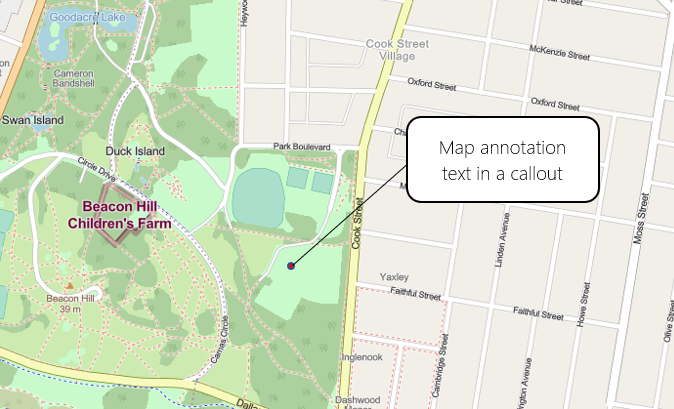
Where I'd like to see VSW go for text annotation is a point, leading line, callout style like this:
 0
0 -

Hey Cam,
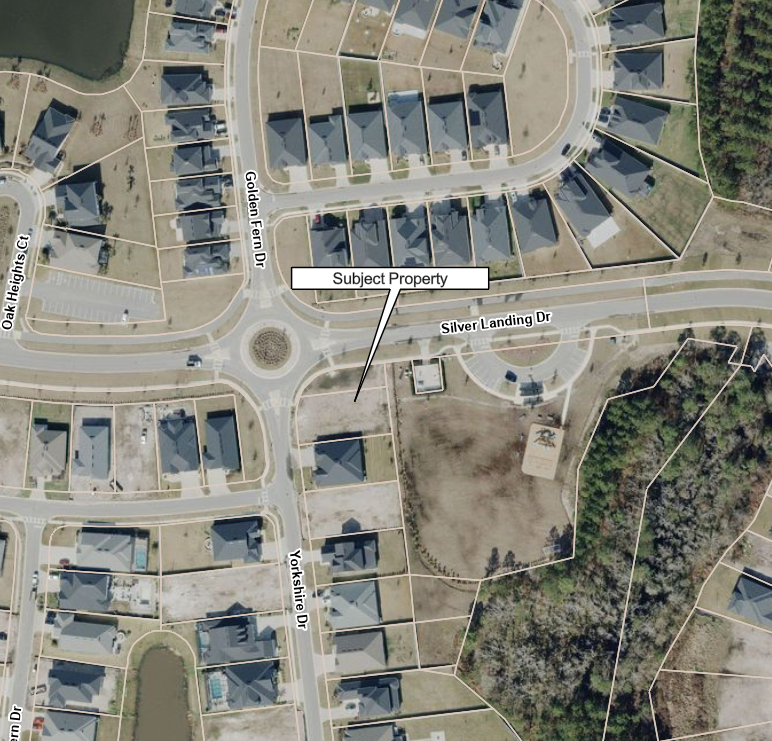
Any progress on this? I sorta built my own. It's not perfect, since the callout is a polygon graphic, it gets larger or smaller as you zoom in while the text stays the same size. You can use the Edit Markup tool in Studio Web to adjust the pointing vertex, increase/decrease the size of the callout box or move the call outbox.
I also found there is no way to adjust the angle of text graphics in the Edit Markup tool, so I build my own in Workflow.
We have several folks in our organization that still have ArcMap licenses. They use ArcMap for the sole purpose of creating simple pdf maps for reports. We do not want to migrate these people to ArcGIS Pro and would like to instead have them use applications built in VertiGIS Studio Web. The functionality of adding callboxes or adding text and manipulating it on a map is vital for simple map production.
 3
3 -

Our users would also like the possibility of adding a point + leading line + callout style.
3
Vous devez vous connecter pour laisser un commentaire.
Commentaires
9 commentaires