Add the ability to close the expand component as soon as an item within the component has been clicked
Répondu
Currently, when clicking an item within an expand component the component remains open, e.g. when you click a basemap in the basemap gallery within an expand component the expand component does not close after having clicked a basemap in the gallery.
Having the option to configure an on-click event which closes the expand component after having clicked an item within this component would be very useful. This especially applies to tools within an expand, e.g. if you add a draw tool (or a toolbar with a draw tool) to an expand you first have to click somewhere in the map to close the expand component and to 'activate' the tool before you can draw on the map. This means an extra click which can be confusing/annoying for the user.
-
Commentaire officiel

Hi Marina,
There is currently a way to close the expand component through the "ui.set-visual-state" command. This can be chained before the command/operations like such:
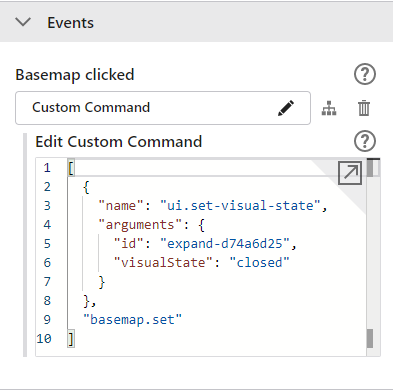
You can find the id of the expand component using VertiGIS Studio Item Manager. This command could also be used to open the expand by setting the "visualState" argument to "open".
-
Thanks Connor! This works like a charm and is exactly what I was looking for!
0 -
Hi Connor,
I have an additional question regarding the way to close the expand component you mentioned. This works fine when using components having events. However, it does not seem to work for the layer presets component. When putting a layer presets component into a expand component I do not see a way to close the expand component when clicking on a layer preset because the layer presets do not contain events in which you can configure the custom command you mentioned. Is there a way to close the expand component when using layer presets within the expand component?
Thanks,
Marina
0 -

Connor,
None of my Expand Components has an Events option. Can you advise on where we need to place this if not available in the component.
Raquel
0 -

Hi, is this possible with on premise? the ui.set-visual-state command appears to be web only.
Thank you
0 -

Hi Marina Bösche @Conner
I'm trying to do the exact same thing. Did you use ‘Event service’ in the VertiGIS Web designer to close the Expand component when a basemap is selected? If so, which event did you listen to and trigger the command to close the Expand. I followed along the browser console to see which events are being fired when a basemap is selected, but could not find a consistent distinct event that can be used.
Appreciate any help on this, Thanks!
0 -
Hi Surya,
You have to add the command ui.set-visual-state tot the specific basemap using the Events section.
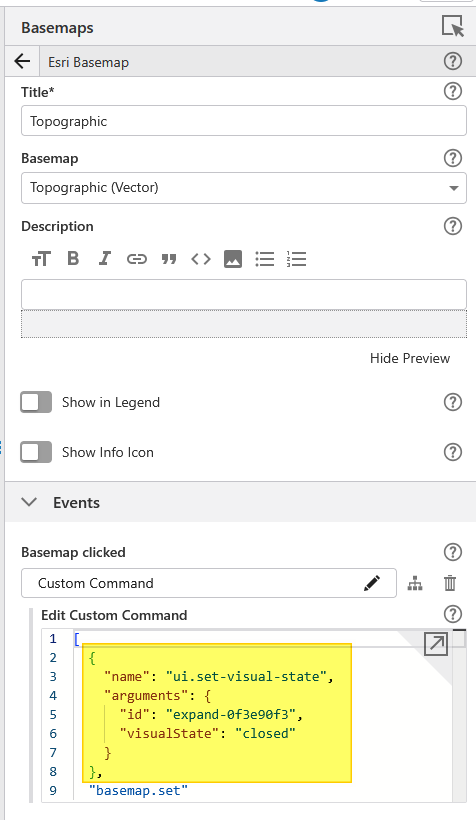
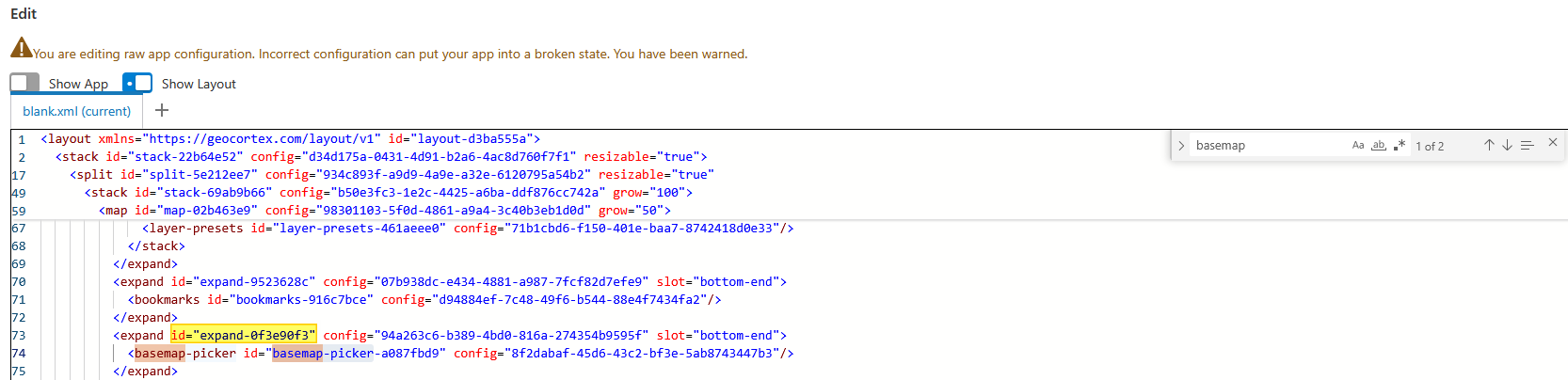
You can find the ID of the basemap-picker expand component using CTRL + SHIFT + E in the VertiGIS Studio Web Designer. Turn on ‘Show Layout’ and search for the basemap picker.
 0
0 -
Thank you, Marina! I was trying to this the roundabout way by creating an event listener. Didn't notice the basemap had the Event feature! Got it to working!
And for Layer Presets, I do not see this section and I believe this functionality can be achieved by using an Event listener. I see VertiGIS has added new events for Layer Presets, were you able to use it to close the Expand? We are at an older version of Web and need to upgrade to use this event.
0 -
Hi Surya, no I was not able to achieve this for the layer presets yet.
0 -

Using ui.set-visual-state works fine, but the Expand-component should still support auto-closing when a child-item has been clicked.
1
Vous devez vous connecter pour laisser un commentaire.
Commentaires
10 commentaires