Generalisation of layers when highlighting
Répondu
Hi all
Is there a way to limit the generalisation that occurs when using the highlights.add or highlights.add-focus commands? Currently it is over generalising the layers, making the highlighting pretty much unusable as an "out of the box product". This occurs on any large area polygon, as shown in the image attached below. The polygon is a multipart polygon, and the highlighting is not even occurring on all polygons, whilst severely overlapping and intersecting on others.

A possible workaround would be to export as markup, as this does not appear to generalise at all, but is a bit of a pain to implement.
Thanks
Rohan
-

H Rohan - we have an issue to figure out a solution for this. The current highlighting and its associated commands and operations were designed to allow highlighting of many 100s of items, and so use an algorithm to limit the complexity of the highlighting to ensure performance.
You (and others) have reported that for use cases where you are highlighting only one (or a couple) of more complex items it is highly desirable to have a more accurate highlight.
As you've noted, there are some workarounds today using markup, but they are much more work to implement.
0 -

Hi Cam, just wondering whether there's been any progress with solving this problem. Since launching our first VertiGIS Web app to users it's been one of their main criticisms, seeing the generalisation as an indication of poor data quality which is frustrating for the data owners and discourages users. Thanks for any update you may be able to provide.
0 -

Hi Cam, I'm also wondering if there's an update to this highlighting issue.
0 -
Hi folks - A lot of our effort over the past while was focused on some big missing features. A story re-examine what is possible here is on our Kanban board now (meaning it should be looked at in a team refinement meeting soon where we get items ready for development). I don't yet know what the approach/solution here is. I'll do my best to communicate what our approach will be once that refinement meeting takes place.
0 -

Was this ever figured out whether its possible to adjust or update generalization when selecting as we are able to do in Essentials? Thank you!
0 -
We did add some Performance related settings here, and one of the options is to remove generalization with a 0 deviation. This works fine for one or two large geometries, but will have performance impacts on many geometries.
At any rate, a couple of settings you can adjust to get you what you are looking for.
Services > Highlighting > Performance
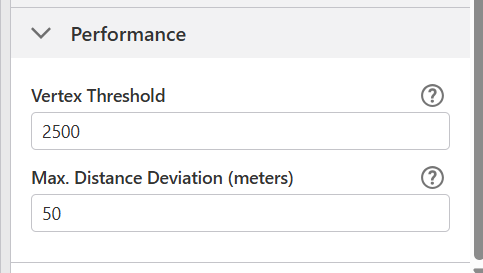 0
0 -
got it, thanks for the update!
0
Vous devez vous connecter pour laisser un commentaire.
Commentaires
7 commentaires