Programmatically change status for button
Répondu
Hello
Is there a way to change status/visual state for a button with a command i VertiGIS Web Studio? When a workflow with a display form is run it opens in a panel on the left side of the app.
This panel has a button that usually controls the activation and deactivation of the panel. And the button changes icon accordingly to its open or closed state.
Here is a image showing the button state when the panel is opened with a workflow.
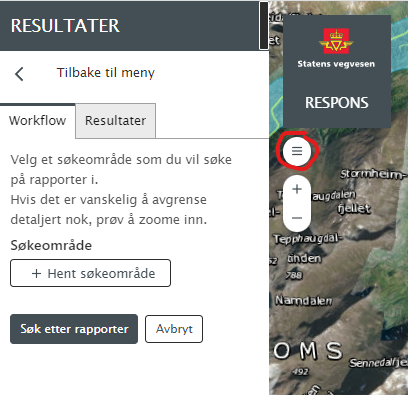
Here is the button state when used to open the left-side panel, the wanted behaviour of the button.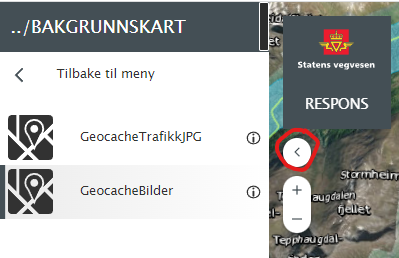
However, when I run a workflow with a display-form it opens this left hand panel without changing the button status. To mend this unwanted behaviour I want to try to use ui.set-visual-state to change the visual state, but I am not sure if it works on the button.
Has anyone tried to use this command, and knows if it works on buttons? Or even better, has a good way to solve the problem?
-

We looked into this, we couldn't find a simple way to do it. We've got a small story to make this more straight forward in a future version.
0 -

Hi Cam,
Are there any updates on this story? I am looking for the same functionality.
Moreover, is there any documentation on the different 'visual states' that can be set by the ui.set-visual-state command? On the documentation website, there is no futher explanation as to what the different options are.
Thanks in advance
Cheers, Daan.
0 -
Thanks for the reply Cam Barnard
Are there any updates on this matter? This is still a very requested feature.kind regards
Tor1 -
Cam Barnard, any news on this feature?
1
Vous devez vous connecter pour laisser un commentaire.
Commentaires
4 commentaires