Edit markup for points
Répondu
Hi all
Is there any plans to allow for editing of point layer styles soon using the browser? Currently, it is not supported, which I'm not sure is intentional or just a bug
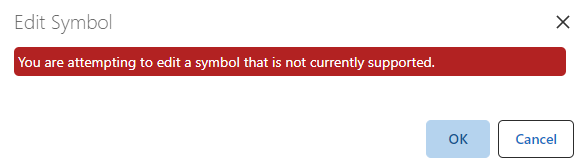
Thanks
Rohan
-

Yes, it is on our list.
We may end up delivering this in two stages, the first to give you based re-symbolization of points ... then in a 2nd stage getting into some of the more complicated requirements around picture marker symbol libraries, rotation, and the like.
1 -
... correct, it is not a bug, it is not yet implemented.
0 -
Thanks for the prompt response, looking forward to seeing it upon release as this will be very useful for some of our users who need it for planning requests!
0 -

Hi Cam, do you have an update on when the 1st stage of editing point features is likely to be available? This would probably satisfy the majority of our users. Thanks.
0 -

Can we have an update on this subject? Currently we can only edit markup for polygons, not for lines or points.
0 -
You can edit markup (geometry) for points, lines, and polygons today.
You can edit symbology for lines and polygons styles today (configure then draw, no current mechanism to re-symbolize existing markup).
The point symbology stuff is now in dev, I'd expect it to be delivered by the 5.23 April release.
I am also keen to see this one completed because it is blocking a couple of other things I'd like to see done (better CSV/XLSX/Shapefile import experience, Designer configuration interface for creating symbolization presets).
0 -
Thank you for your response Cam. Can you explain what you mean by "configure then draw, no current mechanism to re-symbolize existing markup"?
Currently we can not change the layer style in 5.20. We do not see the error above, but the button doesn't do anything. However we can change the symbology in the webmap directly.
0 -

I guess Cam means you always define new symbology.
In the case above, we see for two polygon layers from the same service (and with just simple symbology. one color for all polygons) we can change the layer style for one layer, for the second layer the layer style dialog doesn't open at all. No messages in browser console.
Is there more documentation for the layers.ensure-can-set-symbol command?
Here https://developers.vertigisstudio.com/docs/web/api-commands-operations-events/#command-layers.ensure-can-set-symbol I find only 'guard command for enabling the layers.set-symbol command.'
What does this command return and how/where can I check this?0 -

Is there any release estimate for more point symbols? I only see basic shapes available, and my users are hoping to see the local government symbols.
1
Vous devez vous connecter pour laisser un commentaire.
Commentaires
9 commentaires