Run workflows in different forms/positions
Répondu
Hi,
I have a question regarding how to force a workflow run in a certain panel/container.
I'm aware that in the designer I am able to set the target where I want my workflow to run. But in that workflow I have a Run workflow command that runs another workflow.
How do you set the target for that workflow? I want it to run in another panel/containter than the other one.
Is there something I am missing?
Kind regards,
Andreas
-

Don't use the Run Workflow activity within workflow. Do a run command workflow activity and use the workflow.run command. From that command you can set a target argument.
What we do, say we want workflow A to trip workflow B. Workflow A resides within the Web app and we set its target. Workflow B also resides in the Web app, set a target, but its hidden. Within A, when we want to trip B, use a workflow.run and set the id (required) argument to B's workflow id. This will use B's web config launching it in the set target from earlier.0 -

Thanks for this information. In the workflow.run command, what exactly is the workflow ID for the required argument? I tried using the URL of the report like you do when using the run workflow activity, but that didn't work. Thanks,
0 -

You need to access the underlying JSON and find the reference of the hidden workflow. It takes a bit of trial & error trying to figure out the correct ID to use… but it will be associated with an “action” and “workflow.run”:
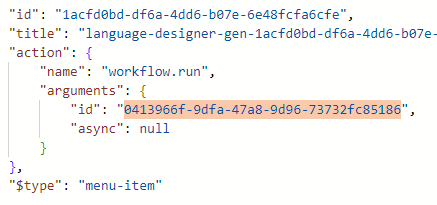 0
0
Vous devez vous connecter pour laisser un commentaire.
Commentaires
3 commentaires