Webmap Quality Difference between app and map
Répondu
Anyone else seeing a lesser quality of their webmap in the VGS Web app than viewing the same webmap in ESRI's map viewer? I have Snap to Zoom enabled, and no love still. I am using a classic tiled cached basemap. Url: https://gis.blm.gov/orarcgis/rest/services/Basemaps/Cached_ORWA_BLM_Carto_Basemap/MapServer
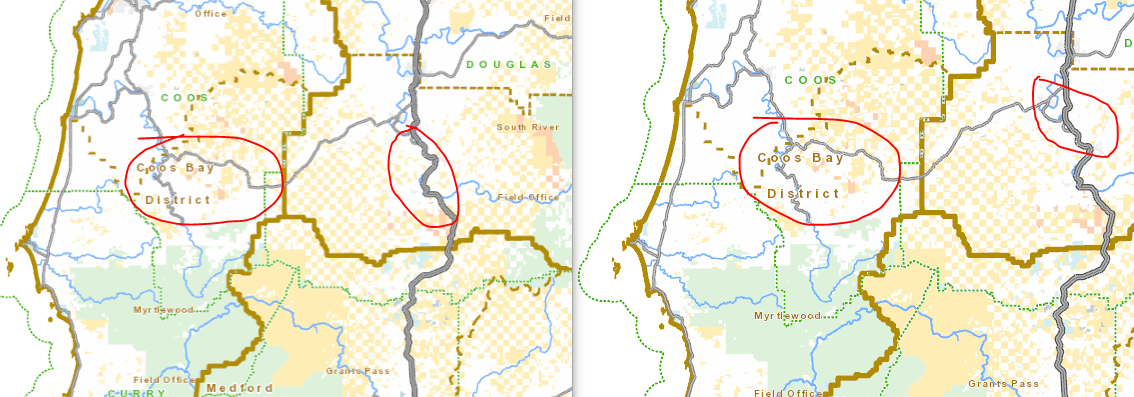
Lett side is webmap in VGS Web app, right side is same webmap in classic map viewer:
-

Maybe this is an issue of the scale landing on a non-cached level, and stretching the tile to fit.
If you use the scale picker and select one of the other existing numbers, does the quality improve?

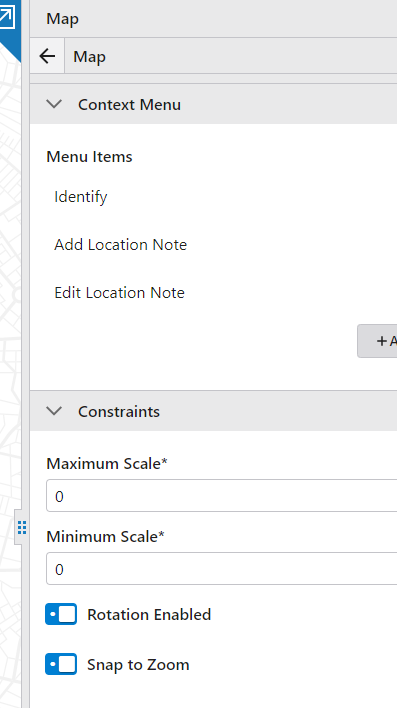
If so, check if the "Snap to Zoom" setting in the Map component helps:
 0
0 -
Hi Amanda,
I had tried that approach as well, and still no luck. Looks like you were playing with our service, per your screen shot. Are you seeing the same visual differences between the map viewer and using the map in VGS Web?
0 -
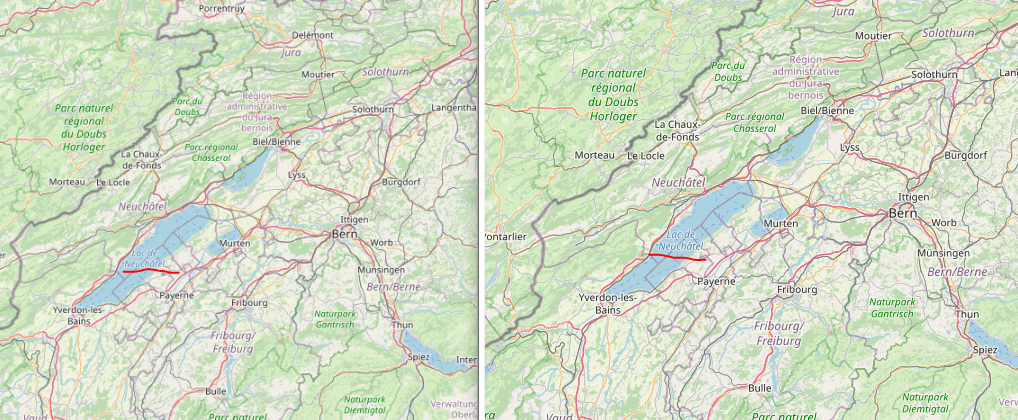
Amanda Frech - I am seeing this same behavior in Open Street Map with the default VGS Web templates. If you open a new SaaS Simple Embeddable Map, in VGS Web, Open Street Map is the default webmap (https://blm-egis.maps.arcgis.com/home/item.html?id=b834a68d7a484c5fb473d4ba90d35e71). If you visually compare the webmap in a SaaS map viewer with the same map in VGS Web, you'll notice a subtle fuzz or downgrade of the dpi. Zoom to Switzerland for example, and you'll see VGS Web just is not as crisp. If I open the web traffic and look at the differrent tile urls, the quality looks the same. Here is sample of that webmap. Left is VGS Web SaaS as of today. Right is same webmap in classic webmap. The lake name I underlined is barely legible onthe left. Anyway, seems like an issue. Our basemap we maintain is only 96dpi, so is more apparent than this example, but wanted to give you an ESRI product to look at. 5.18.1 SaaS has this issue, but 5.18.1 AGS Enterprise does not.
 0
0 -
I tested with the "simple embeddable map" template and was able to reproduce this. I think it does match with the suspicion I mentioned in my last reply. Your screenshot shows the two map images aren't at quite the same scale. The bottom of each image is about the same location, but the tops don't line up. I penciled in a red line showing about where the map viewer one lines up on the Web one.

That means that Web is zoomed out further than the map viewer is. I zoomed using the scroll wheel in Web to get to what seemed close to the same scale as your example. Then I added a "Scale Input" component to the layout. It tells me I'm at 1:1,274,154. I'm pretty sure that's not a cached level for OSM, so it would mean that Web is taking the level 9 OSM tiles (1:1,155,581) and stretching them. I suspect the map viewer is sticking to cached levels and displaying the same tile at 1:1,155,581 with no stretching.
I turned on the "Snap to Zoom" option in the Map component of Web, saved the app, and reloaded. Then I used the mouse wheel to zoom to the same lake. Now the Scale Input tells me I'm at 1:1,155,581, which is an exact tile level, and the labelling seems less blurry
 0
0 -
Thanks for taking a look Amanda Frech. I did exactly do your steps, even saving and re-loading, but the map is still not quite as clear. I always have snapping to zoom on when using any basemap as well. If I open that same webmap in map viewer and then build a WAB app from it, it is much clearer than what I am seeing in VGS Web, where zoom to snap is turned on. I am not sure how else to prove this at this point, but our basemap is too fuzzy to use the SaaS VGS Web product for our apps unfortunately.
0 -
Hey Amanda - this is my last post on this:) The same app looks great in Firefox, but not Chrome. Certain webmaps using the same sources config'd by others I bring into VGS Web look just fine... So, not sure what is going on, maybe it's just me. I am going to forget about this for now, and again, appreciate you taking a look yesterday.
0
Vous devez vous connecter pour laisser un commentaire.
Commentaires
6 commentaires