Customize "Result Details" component
Répondu
Hi there are a few things I'm trying to achieve here. We can see how the default Result Details shows data.
1. However my client does not like how unconsized (spaced out) the details are dipsplayed.
a. Is there a way make this view more compact?
b. Is there a way to display the results as a table instead?
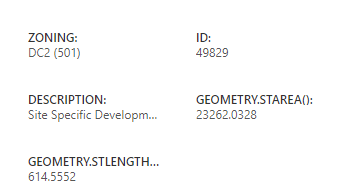
2. We want to get rid of some fields (ie: "GEOMETRY.STAREA()"), that's really not usefull for our end users. I can't find a way to do that, neither in the Identify, the Result Details or the Map in the layer configs. I tried to use the Hide Field option, but that doesn't seem to save with the Map. (shown in screenshot)

Any help with this would be greatly appreciated.
Thank you
-

1a. Maybe look into these commands:
- results.set-list-card-size
-
ui.set-density
If those don't work, custom CSS to shrink padding/margins on specific classes.
1b. Yes, you could have a btn on the results context menu to swap between table/list. You'd need to have two results containers - table and list. Or force all results to table/list: results.set-display-components
2. Right idea but your doing it in the wrong spot. In your screen, your only hiding that field in that currently opened table - that doesn't save in the map. You need to be hiding it via the layers/tables properties - in web map beta, clicking on a layer/table should open up the layer properties over on the right side of your screen. Those should transfer over into the web app as your expecting.
1 -

You can hide the fields in the web map popup (see image below).
I have had a couple of conversations with support about configuring this, as well as the results list. They are looking into improving the functionality but for now it is fairly limited.
Here is a link to my post on the results list if you want to follow it as well in case support posts any new ideas or solutions. https://community.vertigis.com/hc/en-us/community/posts/5183680287122-Configure-Results-List-like-GHV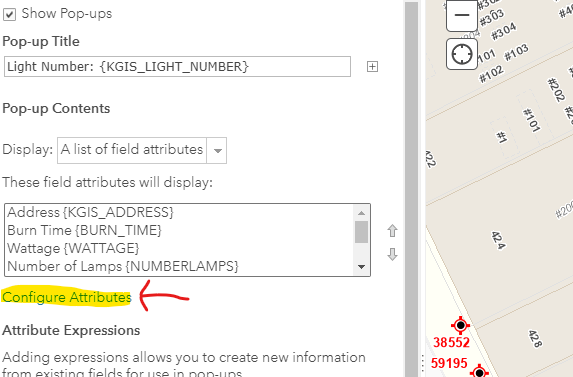 1
1
Vous devez vous connecter pour laisser un commentaire.
Commentaires
2 commentaires