Allow Geometry Picker value setting via workflow
Terminée
In GVH, it was possible to fill in the value of a Geometry Picker (form element) via a workflow. This possibility apparently exist in Studio Web (Add value to geometry picker – VertiGIS)
It would be interesting for it to also exist for Vertigis Studio Go.
Note: having all form elements setting (and re-setting) possible via workflow for Vertigis Studio Go would be quite good.
-

VertiGIS Studio Support any updates on this? 🙏
2 -

Hi Cecile Coutelier and Sander Broekaert, I am Jack from the Mobile team here to answer your inquiry. Thank you for helping contribute ideas to Mobile, and my apologies for the time it took to get back to you.
I am glad to inform you that this idea has been accepted and filed in our backlog. We will need to perform some discussion first before we can go ahead with development. I've enabled changelog on the item; please use number “318893” to look it up and check its status at https://changelogs.vertigis.com/.
0 -
❤️
0 -
Hi Cecile Coutelier, Sander Broekaert, and other that have been waiting for this to be released. I am pleased to inform you all that this has been developed and added to Go! This will be included in the 5.37 release, which is going out in the next month or so.
Please note that setting the geometry picker's value will replace all currently set values, and there is a slightly different method to setting the first value vs setting the subsequent values:
-
Setting the geometry picker's value is equivalent to setting its first point, and it is done using the following code and replacing
$mapExtent2.centerwith the desired geometry point:$form1.state.geometryPicker1.value = { "Format": "point", "Geometry": [$mapExtent2.center], "RefValueType": "geometry" }; - Setting subsequent point is done using the following process:
-
Get the array of geometry items in the picker and append the new geometry to the array. Similar to the previous step, replace
$mapExtent7.centerwith the desired geometry point:=function (){ var arr = $form1.state.geometryPicker1.value.geometry; var newArr = arr.concat($mapExtent7.center); return newArr; }() - Set the array as the picker's value using the Set Form Element Property activity:
-

These two paths can be combined using an If activity that would check the number of elements in the geometry picker before deciding to set its value directly or manipulate its array and set the value.
As always, please feel free to reach out with any concerns or questions you may have :)
0 -
-
Thank you Jack Basha !
0 -
Anytime! :)
0 -

Jack Basha I am trying to accomplish this as well. I wnat to edit an exsisting feature but cannot get this to work Is it possible to share the worfklow or at least part of the workflow. I get already stuk at set form element property. I got a simple line wirth 2 points. In the log I see geometry in $getWorkflowInputs.inputs.context.geometry.Extent with StartPoint and EndPoint but this gives errors
So I tried Extent.Center even knowing this is not correct but trying to get some geometry in it to start with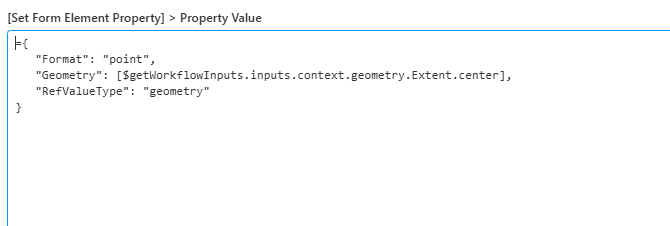 0
0 -
To be clear. I want to add a polyline to the geometry picker. Based upon your axample I get a point to work but not for a line.
This warning is in the console:
Debug 04/13/2026 15:09:23 Unable to convert GeometryPicker's Value to GeometryRef type
System.MemberAccessException: Cannot create an instance of VertiGIS.Workflow.GIS.ArcGISRuntime.Wrappers.GeometryWrapper because it is an abstract class.
at System.Reflection.RuntimeConstructorInfo.CheckCanCreateInstance(Type declaringType, Boolean isVarArg)
at System.Reflection.RuntimeConstructorInfo.ThrowNoInvokeException()
at System.Reflection.RuntimeConstructorInfo.Invoke(BindingFlags invokeAttr, Binder binder, Object[] parameters, CultureInfo culture)
at System.Reflection.ConstructorInfo.Invoke(Object[] parameters)
at VertiGIS.Mobile.Composition.Messaging.ObjectConverter.ObjectConverterHelpers.CreateInstance(Type type, Object input, ObjectConverter converter)
at VertiGIS.Mobile.Composition.Messaging.ObjectConverter.IsAToHasAConverter.Convert(Object input, Type outputType, ObjectConverter converter)
at VertiGIS.Mobile.Composition.Messaging.ObjectConverter.ConvertInner(Object input, Type outputType, Object& context)
at VertiGIS.Mobile.Composition.Messaging.ObjectConverter.CollectionConverter.CreateArray(IEnumerable input, Type elementType, ObjectConverter converter)
at VertiGIS.Mobile.Composition.Messaging.ObjectConverter.CollectionConverter.Convert(Object input, Type outputType, ObjectConverter converter)
at VertiGIS.Mobile.Composition.Messaging.ObjectConverter.ConvertInner(Object input, Type outputType, Object& context)
at VertiGIS.Mobile.Modules.Workflow.WorkflowGeometryPicker.NormalizeValue()0 -
I found the solution….
0
Vous devez vous connecter pour laisser un commentaire.
Commentaires
9 commentaires